# INTRODUCTION


# Introducing Asset Chain

Everything you need to build on the Asset Chain.

### What is Asset Chain? <a href="#what-is-fantom" id="what-is-fantom"></a>

Asset Chain is the native blockchain for Xend Finance Real-World Asset OAE (Onchain Asset Environment); with its consensus based on Fantom's Lachesis consensus.

This enables a fast, scalable, and secure smart contract platform.

[Lachesis](https://docs.fantom.foundation/technology/lachesis-abft) is a revolutionary aBFT consensus mechanism, that allows Asset Chain to be faster and cheaper than previous technologies while retaining security.

Asset Chain is:

* Permissionless
* Decentralized
* Open source

### Key features <a href="#key-features" id="key-features"></a>

#### Speed <a href="#speed" id="speed"></a>

Asset Chain achieves transaction finality in 1–2 seconds on average.

**Scalability**

Asset Chain can process up-to 5000 transactions per second and can scale to hundreds of thousands of nodes.

**Security**

The Lachesis consensus provides institutional-grade security to the distributed network. Asset Chain offers absolute finality, which means that transactions can never be reverted like in networks with probabilistic finality.

Asset Chain is also leaderless. By removing leaders, security does not rely on a small set of actors in charge of block production.

**Smart Contract Support**

Asset Chain is fully compatible with the Ethereum Virtual Machine. Developers can create and deploy smart contracts as they would on Ethereum.

### Get started <a href="#get-started" id="get-started"></a>

Here are some useful links to get you started:

* [Deploy a smart contract](/readme/quick-start)
* [Bridge on Asset Chain](/tools/bridge)
* [Operate a Node](/tools/operate-a-node)

### Reference

Asset Chain is built on [Fantom's](https://fantom.foundation/) revolutionary Lachesis consensus mechanism. Special thanks to the Fantom team.


# Quick Start

In this section we'll get you deploying a sample contract on Asset Chain in less than 10 minutes.

Let’s see how to deploy a smart contract on Asset Chain using the [Remix IDE](https://remix.ethereum.org/) for simplicity.

### Get everything ready <a href="#get-everything-ready" id="get-everything-ready"></a>

Before getting started:

1. Follow for the step-by-step on how to add Asset Chain testnet to [Metamask](/general-info/add-asset-chain).
2. This guide assumes you have got Testnet RWA and connected to the Asset Chain Testnet Network. Learn how to do that in [Testnet Faucets](/tools/faucets).

We are ready to get started!

### Remix & Sample Code <a href="#remix-and-sample-code" id="remix-and-sample-code"></a>

[Remix](https://remix.ethereum.org/) is a no-setup tool for developing smart contracts. It’s easy to get started allowing a simple deployment process, debugging, interacting with smart contracts, and more. It’s a great tool to test quick changes and interact with deployed smart contracts.

<figure><img src="https://github.com/theiceeman/asset-chain-docs/blob/main/introduction/broken-reference" alt=""><figcaption><p>smart contract code sample</p></figcaption></figure>

For the sake of this tutorial, we will be deploying the ‘ERC20Token.sol’ smart contract for minting a fungible token, but you can use any of your code.

You can copy and then paste this in Remix or use your own contract code. Here's the sample code:

ERC20Token.sol

```solidity
// SPDX-License-Identifier: MIT
pragma solidity ^0.8.0;
import "https://github.com/OpenZeppelin/openzeppelin-contracts/blob/v4.9.3/contracts/token/ERC20/ERC20.sol";

contract ERC20Token is ERC20 {
    constructor(string memory _name, string memory _symbol)
        ERC20(_name, _symbol)
    {
        _mint(msg.sender, 1000000000 * 10**decimals());
    }
}

```

### Steps to deploy <a href="#steps-to-deploy" id="steps-to-deploy"></a>

1. Copy the sample code and paste it in one of the .sol files in Remix
2. To compile your smart contract, go to the `Solidity Compiler tab` and select the contract you want to compile
3. Click on "Compile", you can also enable "Auto Compile" for automatic compilation whenever you change the contract code.

Make sure to open the advanced configurations and setting the solidity compiler to below 0.8.19. This is to avoid incompatibility with the recent `PUSH0` opcode.

![](https://docs.mode.network/~gitbook/image?url=https%3A%2F%2F2176895816-files.gitbook.io%2F%7E%2Ffiles%2Fv0%2Fb%2Fgitbook-x-prod.appspot.com%2Fo%2Fspaces%252FmOUA87dDndFyiETJjxpf%252Fuploads%252FgvDYYhLyR0v2evtGgZe7%252Fimage.png%3Falt%3Dmedia%26token%3D1a9fe833-6167-487f-a89d-d5cc313d53a1\&width=768\&dpr=4\&quality=100\&sign=4a0175cbb69b731dc9ab52ed73451d163a398d62c2868e34631bc8bfa145c211)

1. Once the smart contract is compiled successfully, switch to the "`Deploy & Run Transactions`" tab.
2. In the "`Environment`" dropdown menu, select "`Injected Provider - MetaMask`"; this will connect your MetaMask to Remix and will allow you to make transactions from that connected wallet.

Make sure to have Asset Chain Testnet as your selected network in Metamask before deploying.

![](https://docs.mode.network/~gitbook/image?url=https%3A%2F%2Flh4.googleusercontent.com%2FjmsucoJ4vr4ByW3_0Nt4gwlckzu78pvh7ugVp2nEep9z9LtpY-BuC5WmhX4k_uKk2vA_iIvDZg-VEn8YDzKdoSzmE327wjbLiCIpCGe9xc_GAxBOC5-LYet-qBNPQ54W5waFpeMZak61a-rmk_ITxog\&width=300\&dpr=4\&quality=100\&sign=8abd245423fe32a3df61b633698504982aad62c31a9c4e3c6e2336a19e4fb375) ![](https://docs.mode.network/~gitbook/image?url=https%3A%2F%2Flh6.googleusercontent.com%2FnIYOD8FEnw-1qCtgMI_uKK4qRwEjciveycdc3q6iLtuW7su7sOQMZHhG1dw8Rwk2ulO4JFlQU8YxQlJIB8c6uMZJ5t19PCikrkIKVsRZW68PVRz8RVs1NtQOxrQ6x7CwZXtwjlv6W4Fe9x45_44LWSQ\&width=300\&dpr=4\&quality=100\&sign=dd7dac6bc0c696aeb1fbf00a5d4b6fd03533ea96ad855e006ca34a4ea1d00621)

1. Select the compiled contract you want to deploy and click ‘Deploy.’

Now, MetaMask should pop up and ask you to confirm the transaction with super low fees.

<div align="left"><figure><img src="https://github.com/theiceeman/asset-chain-docs/blob/main/introduction/broken-reference" alt="" width="208"><figcaption></figcaption></figure></div>

{% hint style="success" %}
**Congrats! You just deployed your first smart contract to Asset Chain.**
{% endhint %}

To learn more about Asset Chain and how to turn your code into a business, join our [Discord](/readme/dev-onboarding-checklist) and say hello 👋


# Dev Onboarding Checklist

We made you a checklist, to guide you through the most important things, to get started on the Asset Chain.

#### Asset Chain Technical Roadmap <a href="#mode-technical-roadmap" id="mode-technical-roadmap"></a>

* [ ] Add Asset Chain Mainnet and Testnet to your wallet - [Add Asset Chain](/general-info/add-asset-chain)
  * [ ] Mainnet Added
  * [ ] Testnet Added
* [ ] Deploy a smart contract on Asset Chain testnet
  * [ ] [Quick start](/readme/quick-start)
  * [ ] [Deploying a Smart Contract](/readme/quick-start)
  * [ ] [Verifying your smart contract](/general-info/contract-verification)

#### Socials <a href="#socials" id="socials"></a>

* **Asset Chain Twitter / X:** [https://x.com/rwaassetchain<br>](https://x.com/rwaassetchain)
* **Asset Chain Discord:** [https://discord.assetchain.org](https://discord.assetchain.org/)
* **Telegram:** <https://t.me/AssetChainBuilders>
* **Youtube:** [https://www.youtube.com/@AssetChain<br>](https://www.youtube.com/@AssetChain)
* **LinkedIn:** <https://www.linkedin.com/company/theassetchain>
* **Community Blog:** <https://medium.com/asset-chain>
* **GitHub:** <https://github.com/xendfinance>


# TECHNOLOGY


# Overview

What is Asset Chain?

Asset Chain is a decentralized, open-source, smart contract platform that aims to provide fast, secure, and scalable infrastructure for decentralized applications (dApps).

The platform is designed as a next-generation blockchain platform to address several limitations of existing blockchains. Lachesis, a revolutionary [**aBFT consensus protocol**](https://docs.fantom.foundation/technology/lachesis-abft)**,** has made Asset Chain faster and cheaper than previous technologies while retaining security.

Asset Chain's key differentiating factor from other smart contract platforms is its focus on improving the performance of the underlying distributed ledger, meaning no segmentation between different networks, thereby not trading security for performance.


# 2️⃣ 2️⃣ Lachesis aBFT

Explain Lachesis consensus

Lachesis is a breakthrough **aBFT consensus algorithm**.

Below are the key properties of the Lachesis algorithm:

* **Asynchronous**: validators process transactions independently and are not forced to work on the current block being produced.
* **Leaderless**: no participant plays a special role, such as being the leader in producing a block.
* **Byzantine fault tolerant**: functional even with up to one-third of faulty or

  malicious nodes.
* **Final**: transactions are confirmed within 1-2 seconds.

Lachesis allows scaling transaction throughput while keeping **instant finality** without an increased risk of centralization.

### How does Lachesis work? <a href="#how-does-lachesis-work" id="how-does-lachesis-work"></a>

Asset Chain's consensus mechanism, Lachesis, combines asynchronous Byzantine fault tolerance (aBFT) with directed acyclic graphs (DAGs). aBFT allows nodes to process transactions independently without requiring the sequential exchange of blocks, resulting in faster transaction times. DAGs, which represent blocks of transactions connected in a non-linear manner, facilitate this.

In Lachesis, each validator has its own local DAG and creates blocks from incoming transactions, which are added to its DAG. Validators asynchronously exchange these blocks, spreading information through the network. Once a majority of validators agree on a block, it is added to a blockchain containing all final consensus transactions, which is the Asset Chain mainnet.

By combining the advantages of aBFT and DAGs, Lachesis achieves fast and efficient transaction processing, with the whole process of submitting a transaction and adding it to the mainnet taking approximately **1-2 seconds**.

### What are epochs in Lachesis? <a href="#what-are-epochs-in-lachesis" id="what-are-epochs-in-lachesis"></a>

Lachesis’s structure is a DAG of events. To optimize storage and retrieval, the DAG is separated into sub-DAGs, each of which is called an epoch. Each epoch comprises many finalized blocks.

Each epoch is sealed when one of these conditions is satisfied:

* The epoch reaches a defined number of blocks
* The epoch lasts for a specified time
* At least one cheater is found in this block

When an epoch gets sealed, its inner epoch indexes get pruned, and new events of the sealed epochs are ignored. Each epoch forms a separate DAG, and thus parents from other epochs are not allowed.

For a sanity check, each event includes the hash of the previous epoch.

### Comparison of Consensus Protocols <a href="#comparison-of-consensus-protocols" id="comparison-of-consensus-protocols"></a>

| Consensus Protocols  | Nakamoto | pBFT | Lachesis aBFT |
| -------------------- | -------- | ---- | ------------- |
| Scalable             | +        | +    | +             |
| Low Latency          | -        | -    | +             |
| Highly Decentralized | +        | -    | +             |
| Secure               | +        | +    | +             |
| Green                | -        | +    | +             |


# Proof of Stake

### What is Staking? <a href="#what-is-staking" id="what-is-staking"></a>

Staking is the process of **securing the network by locking up your tokens**. It serves the same purpose as mining in a proof-of-work network such as Bitcoin.

Validator nodes validate transactions and the staked tokens act as an **economic incentive** for them to play by the rules of the network. Since validators are anonymous to make the network decentralized and resilient to attacks from the outside, Asset Chain employs proof of stake to prevent Sybil attacks.

Asset Chain requires validator nodes to lock up at least 30,000 RWA (Asset Chain's native token) to prevent Sybil attacks.

Proceed below for more details, on the types of staking supported on Asset Chain.

{% embed url="<https://app.gitbook.com/o/ozWPjpnLQnWe0tZlB7Iz/s/fOxLaEO4KRS4jU54Jd4B/~/changes/34/general-info/staking>" %}


# Transaction Fees

### Basics <a href="#basics" id="basics"></a>

Each transaction on Asset Chain requires a transaction fee paid to the network in order to prevent spam attacks and reward validators for processing transactions. The fee is paid in RWA (Asset Chain's native token).

### Rewards distribution <a href="#rewards-distribution" id="rewards-distribution"></a>

Rewards distribution is fully controlled by our Special Fee contract. The Special Fee contract can be upgraded by governance at any time without a hard fork. The current distribution of transaction fees are:

* 20% to the Ecosystem Treasury
* 80% to Validators


# Block Finality

How much time it takes to finalize a block on Asset Chain.

Finality is the point at which a transaction on a blockchain becomes irreversible and permanently recorded. But before we dive in further, it’s important to have a basic understanding of how a blockchain works.

At its core, a blockchain is simply a database that contains transactions. When a transaction is submitted to a blockchain, it’s not added directly to it. Rather, it’s bundled into a “block” alongside other transactions, which is then incorporated into the database. As such, a blockchain is a sequential chain of blocks that contain transactions, hence its name.

<figure><img src="https://docs.fantom.foundation/~gitbook/image?url=https%3A%2F%2F214665317-files.gitbook.io%2F%7E%2Ffiles%2Fv0%2Fb%2Fgitbook-x-prod.appspot.com%2Fo%2Fspaces%252F-MKjpUMrhoyibSIWfRrl%252Fuploads%252FGSdFgvqTGJIfUC5YLSVE%252FTouring%2520Sonic%2520-%2520Blockchain.png%3Falt%3Dmedia%26token%3D02b298e0-613e-4ab9-a4fb-f1771e782eb0&#x26;width=768&#x26;dpr=4&#x26;quality=100&#x26;sign=23f7b0ec9a348d257151966505a682c74c56f0a22503fe6909e3f0c42d51a966" alt=""><figcaption><p>chain of blocks, representing a blockchain.</p></figcaption></figure>

Most importantly, a blockchain is decentralized, which means it doesn’t run on a single server. Instead, the blockchain exists simultaneously on a massive amount of computers around the world that run software to communicate with each other and agree on the content of the database. (On Asset Chain, these computers are called **validators**.)

It’s these computers that bundle transactions into blocks and add them to the blockchain at frequent intervals. Every \~10 minutes for Bitcoin, every \~12 seconds for Ethereum, and every \~0.4 seconds for the Sonic closed testnet.

<figure><img src="https://docs.fantom.foundation/~gitbook/image?url=https%3A%2F%2F214665317-files.gitbook.io%2F%7E%2Ffiles%2Fv0%2Fb%2Fgitbook-x-prod.appspot.com%2Fo%2Fspaces%252F-MKjpUMrhoyibSIWfRrl%252Fuploads%252FuipZA069hoVAjm6X2o3q%252FChain%2520Comparison.jpg%3Falt%3Dmedia%26token%3De0f51eb8-e007-4da2-87d2-4ab57b69b4c7&#x26;width=768&#x26;dpr=4&#x26;quality=100&#x26;sign=2ba10ce5f5831aa071e7f1a53534990429f7f66af6472e8bb381687574c5ce94" alt=""><figcaption></figcaption></figure>

However, once a block is added to the blockchain, it doesn’t mean the transactions contained within are instantly final and permanent. In the majority of blockchains, a single computer is usually picked to create the next block and add it to the blockchain. Other computers in the system then receive this block and validate the transactions within it to make sure they’re valid.

However, due to the design of most blockchains, there can be occasions when two computers are simultaneously chosen to create a block. In such a scenario, how does the rest of the system know which block to follow? Well, they must wait until the next computer is chosen to create the next block, and the previous block used by this computer is accepted as the legitimate one, while the alternative block is disregarded.

This is called the **longest chain rule** as every computer in the system follows the version of the blockchain with the most blocks, which naturally would be the version on the most recent computer chosen to create a block. Both Bitcoin and Ethereum implement this mechanism.

<figure><img src="https://docs.fantom.foundation/~gitbook/image?url=https%3A%2F%2F214665317-files.gitbook.io%2F%7E%2Ffiles%2Fv0%2Fb%2Fgitbook-x-prod.appspot.com%2Fo%2Fspaces%252F-MKjpUMrhoyibSIWfRrl%252Fuploads%252FKtc6gf2IC53FYC0zVJKX%252FTouring%2520Sonic%2520-%2520Longest%2520Chain%2520Rule.png%3Falt%3Dmedia%26token%3Da2ee13ce-e82d-4641-8750-94ada6e0f97b&#x26;width=768&#x26;dpr=4&#x26;quality=100&#x26;sign=b4294d398ac49f8d303adf389920a0ae6d55a172c2b8c640bfe01bdbca71bea0" alt=""><figcaption></figcaption></figure>

After a computer is selected to create the next block, bringing the blockchain back on track, we still have to wait for several more blocks to be created. Due to potential communication delays between the computers in the system, it’s technically possible for some of them to still have the old invalid block in their version of the blockchain.

After a certain amount of blocks have been created, this is no longer a risk as we can assume those outdated computers have undergone **chain reorganization** to change their database to the current and correct one. Only then can we consider the transactions in the initial block as final and irreversible.

And now we’re ready to define **time to finality**, which simply means how long it takes for a transaction to be considered irreversible after it’s submitted. On Bitcoin, it takes around an hour (6 blocks created). On Ethereum, it takes around two minutes (12 blocks created). On the Asset Chain mainnet, it takes **only a few seconds**.

That’s because the design of Asset Chain allows for a block and its transactions to be considered final and irreversible the moment it’s added to the blockchain. The longest chain rule and chain reorganizations do not exist on Asset Chain. Once a transaction has been added to the blockchain, it’s **instantly final**.

There are a few things that work in conjunction to make this possible. On Asset Chain, no single computer is chosen to create the next block. Instead, the block is added to the blockchain once the majority of the computers in the system have received it. As such, there can never be a situation on Asset Chain in which the computers disagree on the state of the database.


# Gas

What is Gas?

In our everyday life, we pay for things we use, like electricity and water. These are measured in units like kilowatt-hours for electricity and cubic meters for water. Similarly, in a decentralized system like Asset Chain, there are charges for activities, and these are measured in "gas."

**What is Gas?**

Gas measures the computational effort needed to process a transaction. It's similar to how much fuel your car needs to drive a certain distance. The "gas used" for a transaction means how much gas was needed to process it.

**Examples of Gas Usage:**

* Transferring RWA tokens: 21,000 gas per transaction
* Swapping between two tokens: 200,000 gas
* Buying an NFT: 600,000 gas

Just like you pay for every drop of fuel, you must pay for every unit of gas used in your transactions.

**Gas Price:**

The gas price is how much you pay for each unit of gas, usually given in "gwei," which is a tiny fraction of an RWA. For example, if a swap transaction takes 200,000 gas and the gas price is 30 gwei (0.00000003 RWA) per gas, you multiply these two numbers to get your transaction fee.

Here's a simple comparison: If your car needs 50 liters of gasoline and the price is 2 USD per liter, the total cost is 50 liters \* 2 USD/liter = 100 USD.

**Why Does Gas Price Change?**

There's limited space in each block for transactions. The gas price depends on how busy the network is. On quiet days, the gas price is low. On busy days, it's high. You can pay a higher gas price to get your transaction processed faster. The amount of gas used doesn't change, but you choose to pay more per unit of gas.

**Gas Limit:**

Sometimes, you don't know exactly how much gas a transaction will need. The gas limit is the maximum amount of gas you're willing to pay for a transaction. If you set the gas limit too low, your transaction might get stuck, just like if you don't put enough fuel in your car, you'll get stranded.

**Who Gets the Transaction Fee?**

The transaction fee goes to validators. Validators are incentivized to process transactions and keep the Asset Chain running by staking RWA tokens. The transaction fee helps prevent spam, deter malicious attacks by making them expensive, and ensures fair use of network resources.

[<br>](https://docs.fantom.foundation/technology/blockchain-basics)


# GENERAL INFO


# Network Details

### Asset Chain Mainnet <a href="#mode-testnet" id="mode-testnet"></a>

| Name            | Value                                |
| --------------- | ------------------------------------ |
| Network Name    | Asset Chain Mainnet                  |
| RPC Endpoint    | <https://mainnet-rpc.assetchain.org> |
| Chain ID        | 42420                                |
| Currency Symbol | RWA                                  |
| Block Explorer  | <https://scan.assetchain.org>        |

### Asset Chain Testnet <a href="#mode-testnet" id="mode-testnet"></a>

| Name            | Value                                                                           |
| --------------- | ------------------------------------------------------------------------------- |
| Network Name    | Asset Chain Testnet                                                             |
| RPC Endpoint    | [https://enugu-rpc.assetchain.org](https://enugu-rpc.assetchain.org/)           |
| Chain ID        | 42421                                                                           |
| Currency Symbol | RWA                                                                             |
| Block Explorer  | [https://scan-testnet.assetchain.org](https://scan-testnet.assetchain.org/)     |
| Bridge          | [https://bridge-testnet.assetchain.org](https://bridge-testnet.assetchain.org/) |


# Add Asset Chain

This guide shows how to add Asset Chain network to your wallet

### Mainnet <a href="#metamask" id="metamask"></a>

To add Asset Chain Mainnet as a custom network to MetaMask:

1. Open the MetaMask browser extension.
2. Open the network selection dropdown menu by clicking the dropdown button at the top of the extension.
3. Click the **Add network** button.
4. Click **Add a network manually**.
5. In the **Add a network manually** dialog that appears, enter the following information:

| Name            | Value                                                                     |
| --------------- | ------------------------------------------------------------------------- |
| Network Name    | Asset Chain Mainnet                                                       |
| RPC Endpoint    | [https://mainnet-rpc.assetchain.org](https://mainnet-rpc.assetchain.org/) |
| Chain ID        | 42420                                                                     |
| Currency Symbol | RWA                                                                       |
| Block Explorer  | [https://scan.assetchain.org](https://scan.assetchain.org/)               |

You should now be able to connect to the Asset Chain Mainnet by selecting it from the network selection dropdown menu.

### Testnet <a href="#testnet" id="testnet"></a>

**MetaMask**[**​**](https://docs.base.org/using-base#metamask)

To add Asset Chain Testnet as a custom network to MetaMask:

1. Open the MetaMask browser extension.
2. Open the network selection dropdown menu by clicking the dropdown button at the top of the extension.
3. Click the **Add network** button.
4. Click **Add a network manually**.
5. In the **Add a network manually** dialog that appears, enter the following information:

| Name            | Value                                                                       |
| --------------- | --------------------------------------------------------------------------- |
| Network Name    | Asset Chain Testnet                                                         |
| RPC Endpoint    | <https://enugu-rpc.assetchain.org/>                                         |
| Chain ID        | 42421                                                                       |
| Currency Symbol | RWA                                                                         |
| Block Explorer  | [https://scan-testnet.assetchain.org](https://scan-testnet.assetchain.org/) |

1. Tap the Save button to save Asset Chain as a network.

You should now be able to connect to the Asset Chain testnet, by selecting it from the network selection dropdown menu.


# Contract Addresses

In this page you will find all the official contract addresses on Asset Chain.

### Mainnet

<table><thead><tr><th width="264">NAME</th><th>ADDRESS</th></tr></thead><tbody><tr><td>Special Fee Contract</td><td><a href="https://scan.assetchain.org/address/0xFC00FACE00000000000000000000000000000000">0xFC00FACE00000000000000000000000000000000</a></td></tr><tr><td>Native Staking</td><td><a href="https://scan.assetchain.org/address/0x52A9489794df0d1AFaf71a26f293306E8A9879eD">0x52A9489794df0d1AFaf71a26f293306E8A9879eD</a></td></tr><tr><td>SwapRouter</td><td><a href="https://scan.assetchain.org/address/0xEC2B2209D710D4283b5d1e29441Df0Dbb9ceE5c3">0xec2b2209d710d4283b5d1e29441df0dbb9cee5c3</a></td></tr><tr><td>Pool Factory</td><td><a href="https://scan.assetchain.org/address/0xa9d53862D01190e78dDAf924a8F497b4F8bb5163">0xa9d53862D01190e78dDAf924a8F497b4F8bb5163</a></td></tr><tr><td>Quoter Contract</td><td><a href="https://scan.assetchain.org/address/0xe83e6B8e8E3ec15D5cbF84cf2B2B44D19A203257">0xe83e6B8e8E3ec15D5cbF84cf2B2B44D19A203257</a></td></tr><tr><td>USDC (Bridged USDC)</td><td><a href="https://scan.assetchain.org/address/0x2B7C1342Cc64add10B2a79C8f9767d2667DE64B2">0x2B7C1342Cc64add10B2a79C8f9767d2667DE64B2</a></td></tr><tr><td>wRWA</td><td><a href="https://scan.assetchain.org/address/0x2584D40B5553E81Bb9deC0b6CD1a2E504AAB1709">0x2584D40B5553E81Bb9deC0b6CD1a2E504AAB1709</a></td></tr><tr><td>USDT</td><td><a href="https://scan.assetchain.org/address/0x26E490d30e73c36800788DC6d6315946C4BbEa24">0x26E490d30e73c36800788DC6d6315946C4BbEa24</a></td></tr><tr><td>WNT</td><td><a href="https://scan.assetchain.org/address/0xEc6943BB984AED25eC96986898721a7f8aB6212E">0xEc6943BB984AED25eC96986898721a7f8aB6212E</a></td></tr><tr><td>BTC (Bitlayer)</td><td><a href="https://scan.assetchain.org/address/0xDBDc8c7B96286899aB624F6a59dd0250DD4Ce9bC">0xDBDc8c7B96286899aB624F6a59dd0250DD4Ce9bC</a></td></tr><tr><td>wETH</td><td><a href="https://scan.assetchain.org/address/0xbe231A8492487aAe6096278A97050FAe6B9d5BEc">0xbe231A8492487aAe6096278A97050FAe6B9d5BEc</a></td></tr><tr><td>wBTC</td><td><a href="https://scan.assetchain.org/address/0xE59EABcDc3C86909a391D0760b039A3f23d48281">0xE59EABcDc3C86909a391D0760b039A3f23d48281</a></td></tr><tr><td>cNGN</td><td><a href="https://scan.assetchain.org/token/0x7923C0f6FA3d1BA6EAFCAedAaD93e737Fd22FC4F">0x7923C0f6FA3d1BA6EAFCAedAaD93e737Fd22FC4F</a></td></tr><tr><td>xRWA Xend Finance RWA</td><td><a href="https://scan.assetchain.org/token/0x02afe9989D86a0357fbb238579FE035dc17BcAB0">0x02afe9989D86a0357fbb238579FE035dc17BcAB0</a></td></tr><tr><td>SHALOM</td><td><a href="https://scan.assetchain.org/address/0xf20f989CAf263C513f9183B4Fed88F14Fc04c8dB">0xf20f989CAf263C513f9183B4Fed88F14Fc04c8dB</a></td></tr><tr><td>Multicall</td><td><a href="https://scan.assetchain.org/address/0x2ae7d90C1cc0C7cf70361EcAaede33D33022215A?tab=read_write_contract
">0x2ae7d90C1cc0C7cf70361EcAaede33D33022215A</a></td></tr></tbody></table>

### Testnet

<table><thead><tr><th width="276">NAME</th><th>ADDRESS</th><th data-hidden></th></tr></thead><tbody><tr><td>Special Fee Contract</td><td><a href="https://scan-testnet.assetchain.org/address/0xFC00FACE00000000000000000000000000000000">0xFC00FACE00000000000000000000000000000000</a></td><td></td></tr><tr><td>USDC (Bridged USDC)</td><td><a href="https://scan-testnet.assetchain.org/address/0x39C6b75fAeAb6B54541BE34860AE6250263377e9">0x39C6b75fAeAb6B54541BE34860AE6250263377e9</a></td><td></td></tr><tr><td>Swap Router</td><td><a href="https://scan-testnet.assetchain.org/address/0x365C8Bd36a27128A230B1CE8f7027d7a9e5A8f82">0x365C8Bd36a27128A230B1CE8f7027d7a9e5A8f82</a></td><td></td></tr><tr><td>Pool Factory</td><td><a href="https://scan-testnet.assetchain.org/address/0xf509c3FbbBa099cD5D949C6621C218B3E52670F8">0xf509c3FbbBa099cD5D949C6621C218B3E52670F8</a></td><td></td></tr><tr><td>Native Staking</td><td><a href="https://scan-testnet.assetchain.org/address/0xA4A6359ECA3d6F458A8515392eCbfEfBc85241Aa">0xA4A6359ECA3d6F458A8515392eCbfEfBc85241Aa</a></td><td></td></tr><tr><td>Test USDT</td><td><a href="https://scan-testnet.assetchain.org/token/0x04f868C5b3F0A100a207c7e9312946cC2c48a7a3">0x04f868C5b3F0A100a207c7e9312946cC2c48a7a3</a></td><td></td></tr><tr><td>WRWA</td><td><a href="https://scan-testnet.assetchain.org/address/0x0FA7527F1050bb9F9736828B689c652AB2c483ef">0x0FA7527F1050bb9F9736828B689c652AB2c483ef</a></td><td></td></tr></tbody></table>


# Contract Verification

Lets verify smart contracts on Asset Chain.

Pro tip: If you deployed your contract with Hardhat, use the Hardhat guide to verify it.

{% hint style="info" %}
Note: from solidity compiler version ^0.8.20 won’t verify successfully.
{% endhint %}

## With Advanced Explorer <a href="#with-advanced-explorer" id="with-advanced-explorer"></a>

**Get Started**

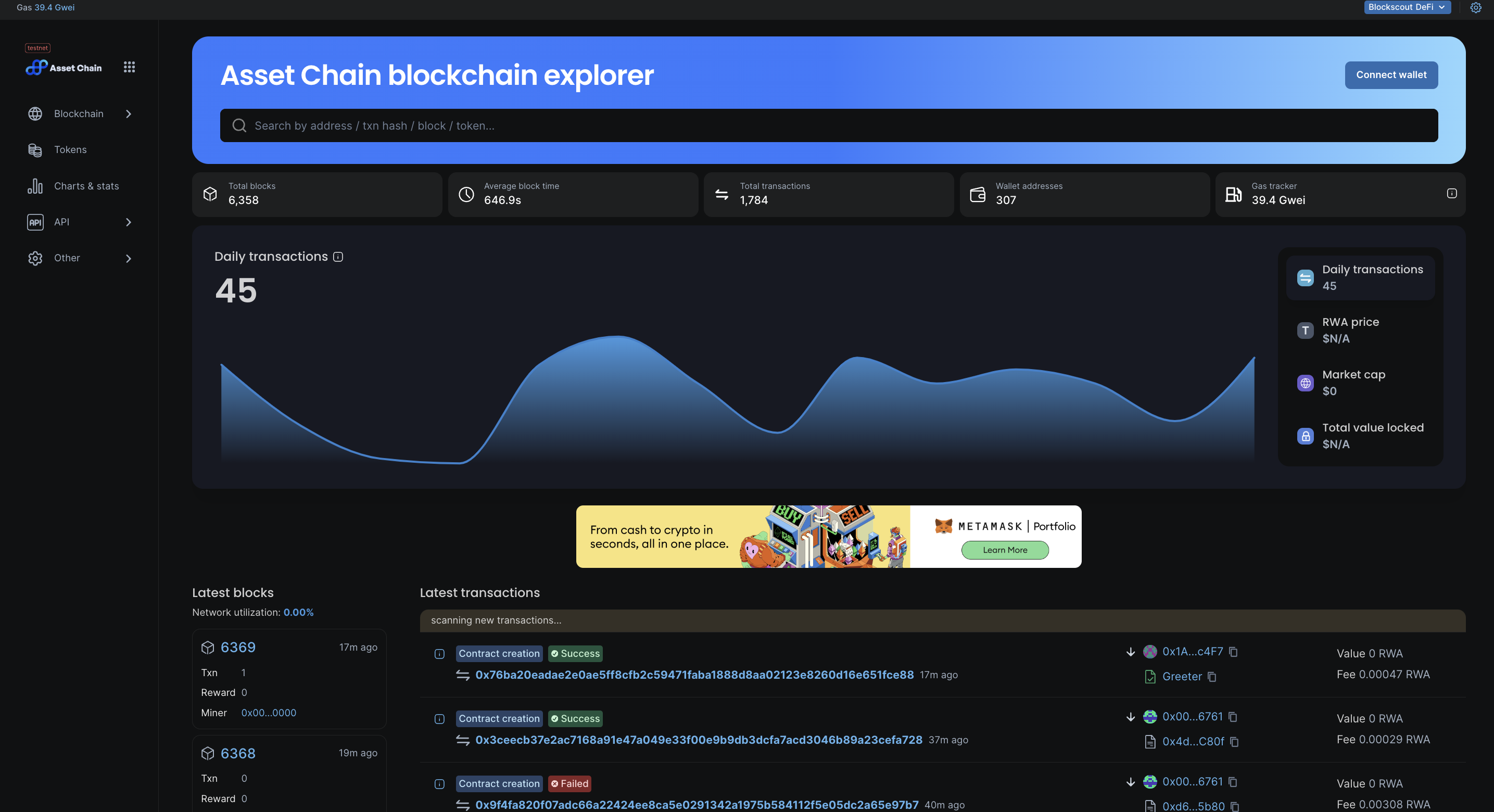
1. Visit the [Asset Chain Advanced Explorer](https://scan-testnet.assetchain.org/)​

<figure><img src="https://files.gitbook.com/v0/b/gitbook-x-prod.appspot.com/o/spaces%2FmuBv3mR5xhQRl9pMrnhC%2Fuploads%2Fgit-blob-670b2a5ff8b98475e986f56e4ab9d9744f16f0c1%2FScreenshot%202024-06-20%20at%2003.09.16.png?alt=media" alt=""><figcaption></figcaption></figure>

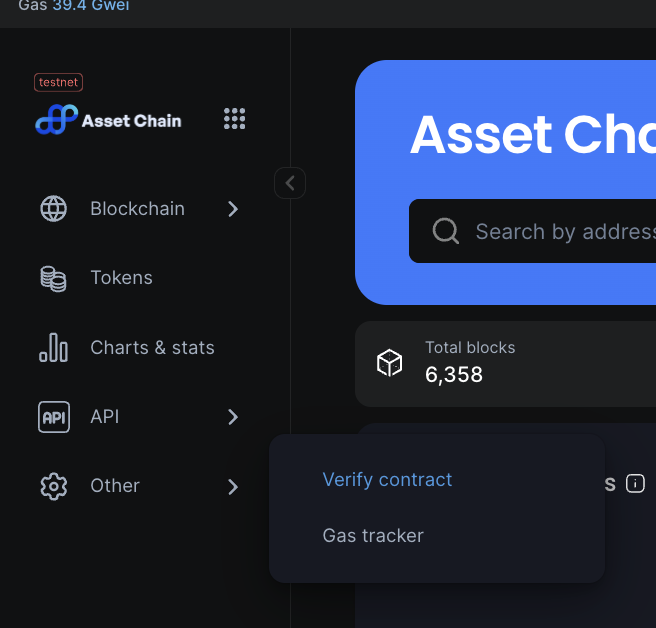
2. On the Sidebar, hover on the \`Other\` link and click on \`verify contract\` link.

<figure><img src="https://files.gitbook.com/v0/b/gitbook-x-prod.appspot.com/o/spaces%2FmuBv3mR5xhQRl9pMrnhC%2Fuploads%2Fgit-blob-c884186cd96088248fd89649d8208ecd9ec4d697%2FScreenshot%202024-06-20%20at%2003.02.56.png?alt=media" alt=""><figcaption></figcaption></figure>

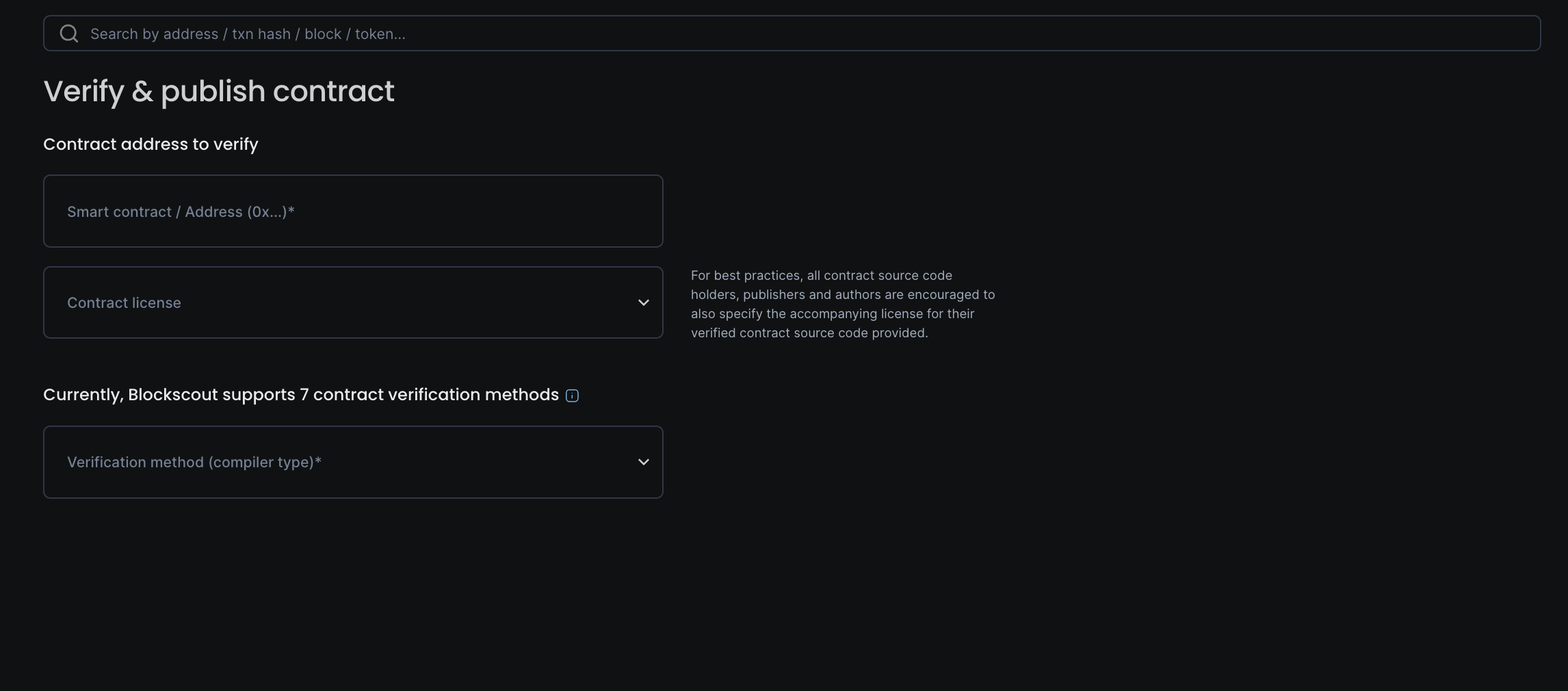
3. Clicking verify contract\` should open up a form similar to the one below. Proceed to enter the parameters with which you compiled your contract.

<figure><img src="https://files.gitbook.com/v0/b/gitbook-x-prod.appspot.com/o/spaces%2FmuBv3mR5xhQRl9pMrnhC%2Fuploads%2Fgit-blob-87107a6e3142f06055fbc4f7982ee2867b5de23b%2FScreenshot%202024-06-20%20at%2003.06.12.png?alt=media" alt=""><figcaption></figcaption></figure>

4. If you submitted the form successfully, your contract has been verified. Visiting the contract page, you should see a page similar to the one below; with an alert showing verified, and your contract code being displayed.

<figure><img src="/files/rBwoGBNS4u9CE2qMOdrn" alt=""><figcaption></figcaption></figure>

## With Hardhat

[Hardhat ](https://hardhat.org/)is a full-featured development environment for contract compilation, deployment and verification. The [Hardhat Etherscan plugin](https://hardhat.org/plugins/nomiclabs-hardhat-etherscan.html) supports contract verification on BlockScout.

#### Get Started <a href="#get-started" id="get-started"></a>

1. **Install Hardhat**

If you are starting from scratch, create an npm project by going to an empty folder, running `npm init`, and following the instructions. Recommend npm 7 or higher.

Once your project is ready:

**NPM instructions**

```bash
npm install --save-dev hardhat
```

**YARN instructions**

```bash
yarn add --dev hardhat
```

2. **Create a project**

Run `npx hardhat` in your project folder and follow the instructions to create ([more info here](https://hardhat.org/getting-started/#quick-start)).

3. Install plugin

Install the [hardhat-etherscan plugin](https://hardhat.org/plugins/nomiclabs-hardhat-etherscan.html) (requires **v3.0.0+).**

**npm**

```bash
npm install --save-dev @nomicfoundation/hardhat-verify
```

**yarn**

```bash
yarn add --dev @nomicfoundation/hardhat-verify
```

4. Add plugin reference to config file

Add the following statement to your `hardhat.config.js`.

```javascript
require("@nomicfoundation/hardhat-verify");
```

If using TypeScript, add this to your `hardhat.config.ts.` [More info on using typescript with hardhat available here](https://hardhat.org/guides/typescript.html#typescript-support).

```javascript
import "@nomicfoundation/hardhat-verify";
```

#### Config File <a href="#config-file" id="config-file"></a>

Your basic [Hardhat config file](https://hardhat.org/config/) (`hardhat.config.js` or `hardhat.config.ts`) will be setup to support the network you are working on. In this example we use the Asset Chain test network and a `.js` file.

Asset Chain is not directly supported by the plugin (to check run `npx hardhat verify --list-networks`)

But we can add it in a `customChains` object, to the config file. It includes:

* `chainID` - 42421
* `apiURL` - "<http://scan-testnet.assetchain.org/api>"
* `browserURL` - "<http://scan-testnet.assetchain.org>"

{% hint style="info" %}
The network name in `customChains` must match the network name in the `apiKey` object.
{% endhint %}

```json
require("@nomicfoundation/hardhat-verify");

let secret = require("./secret");

module.exports = {
  solidity: "0.8.9",
  networks: {
    localhost: {
      url: "http://127.0.0.1:8545/",
      accounts: [secret.key],
    }
  },
  etherscan: {
    apiKey: {
      assetchain_test: "abc"
    },
    customChains: [
      {
        network: "assetchain_test",
        chainId: 42421,
        urls: {
          apiURL: "https://scan-testnet.assetchain.org/api",
          browserURL: "https://scan-testnet.assetchain.org/"
        }
      }
    ]
  }
};
```

#### Deploy and Verify <a href="#deploy-and-verify" id="deploy-and-verify"></a>

#### Deploy <a href="#deploy" id="deploy"></a>

```bash
D:\hard_hat> npx hardhat run scripts\deploy.js --network assetchain_test
Contract deployed to: 0x8595e22825Ba499dB8C77C5c830c235D80f9C0fa
```

#### Verify <a href="#verify" id="verify"></a>

You can include constructor arguments with the verify task.

<pre class="language-bash"><code class="lang-bash"><strong>npx hardhat verify --network &#x3C;network> DEPLOYED_CONTRACT_ADDRESS "Constructor argument 1"
</strong></code></pre>

{% hint style="info" %}
For info on more complex constructor arguments(arrays, tuples..) please [visit here](https://hardhat.org/hardhat-runner/plugins/nomicfoundation-hardhat-verify#complex-arguments).
{% endhint %}

Example (no constructors).

```sh
D:\hard_hat>npx hardhat verify --network assetchain_test 0x263E6d3E8b98fB0393A108825E2DcE3063F66713  --constructor-args ./scripts/arguments.js 
[INFO] Sourcify Verification Skipped: Sourcify verification is currently disabled. To enable it, add the following entry to your Hardhat configuration:

sourcify: {
  enabled: true
}

Or set 'enabled' to false to hide this message.

For more information, visit https://hardhat.org/hardhat-runner/plugins/nomicfoundation-hardhat-verify#verifying-on-sourcify
Successfully submitted source code for contract
contracts/MultiSigWallet.sol:MultiSigWallet at 0x263E6d3E8b98fB0393A108825E2DcE3063F66713
for verification on the block explorer. Waiting for verification result...

Successfully verified contract MultiSigWallet on the block explorer.
http://scan-testnet.assetchain.org/address/0x263E6d3E8b98fB0393A108825E2DcE3063F66713#code
```

#### Confirm Verification on BlockScout <a href="#confirm-verification-on-blockscout" id="confirm-verification-on-blockscout"></a>

Go to our BlockScout Explorer and paste the contract address into the search bar.

<figure><img src="/files/Ha0DaxPRznQbVuntrQXe" alt=""><figcaption></figcaption></figure>

Scroll down to see verified status. A green checkmark ✅ means the contract is verified.

<figure><img src="/files/UoWUYNL9qGLQdEihTC9t" alt=""><figcaption></figcaption></figure>

You can now scroll down in the explorer to see and interact with the contract code.

{% hint style="success" %}
Congratulations! Your contract is successfully verified on Asset Chain Explorer.
{% endhint %}

### &#x20;<a href="#faq" id="faq"></a>


# Staking

Get started with staking on Asset Chain

Staking is an integral part of modern blockchain networks, offering participants the opportunity to earn rewards, contribute to network security, and engage with the community

Asset Chain supports two types of staking:

* Validator Staking
* Native Staking

## Validator Staking

You can decide whether you want to delegate your tokens to an existing validator or become a validator yourself. Delegating is simpler and involves selecting a reliable validator to stake on your behalf.

Validators receive rewards in the form of additional tokens for successfully validating and adding blocks to the blockchain.

Proceed with the link below to get involved in this process.

{% embed url="<https://testnet.assetchain.org/staking>" %}

## Native Staking

Native Staking encourages active participation from the community. Token holders have a vested interest in the network’s success and are incentivized to act in its best interest.

This helps to increase users interest and their staking score on Asset Chain. This staking score can be used to access other important values in the Asset Chain ecosystem.

Proceed with the link below to get involved in this process.

**Mainnet:**

**Testnet:** [https://testnet-stake.assetchain.org](https://testnet-stake.assetchain.org/)

If you're ready to stake your RWA tokens on Asset Chain, please follow the guide below.

{% embed url="<https://academy.assetchain.org/module-4-intermediate-tutorials/staking>" %}


# Security

Integration with SolidityScan on Asset Chain Advanced Explorer

Asset Chain's integration with SolidityScan on our Advanced Explorer's, provides users with enhanced security insights into the contracts they interact with on Asset Chain.

This feature helps protect users from interacting with malicious Smart Contracts and fosters a safer ecosystem.

### How to Use

1. Visit an address that has a contract deployed to it.
2. Ensure that the contract is verified.
3. Click on the shield icon located at the top right corner.

<figure><img src="/files/3CSCSJHpHnoEBrYtOuAo" alt=""><figcaption></figcaption></figure>

4. This action will display a dropdown containing a general audit report for the contract.

<figure><img src="/files/XeQXeBsNi7lKoIXL0zO0" alt="" width="346"><figcaption></figcaption></figure>

5. To view a more detailed report, click on "View Full Report." which redirects you to an overview page below.

<figure><img src="/files/9i8rVzqiMocCjrP9aEip" alt=""><figcaption></figcaption></figure>

6. You can scroll down for additional insights into the vulnerabilities identified.

<figure><img src="/files/pkr8lEEFlLcLm4NtVxmG" alt=""><figcaption></figcaption></figure>

{% hint style="success" %}
Congratulations! Thats how you get started with protecting yourself from Malicious smart contracts on Asset Chain.
{% endhint %}


# TOOLS


# Operate a Node

Getting started with running your node on Asset Chain.

We curated a guide to start running your own node:\
<https://github.com/xendfinance/assetchain-blockchain>

As the first blockchain explicitly designed for legally compliant asset tokenization and management, we recognize that our own nodes are assets too and should be tokenized accordingly.

This approach will lead to the full tokenization of Asset Chain nodes, integrating them into the very blockchain they run. This innovative setup creates what we refer to as 'liquid nodes,' a unique infrastructure that enhances the blockchain's functionality and accessibility.

Asset Chain supports 2 types of nodes

* Liquid nodes
* Standalone nodes

*Below is a visualization of this innovative approach:*

<figure><img src="https://lh7-us.googleusercontent.com/V8KEkLxmackMaWvOKL78sduTzLx2D0DOaSzDCNZu_iAPCKcodKFH7XtBVShgDpRoZvH7KZ_e71o1doNeIZAVEs8blkN7qxK2Ga_hDN7sZ7BBz1fadfrDhVDfQ-V8JdtK-fdNk3z2Xsj-Gtq7feUSgVE" alt=""><figcaption><p>Xend Finance Liquid node infrastructure</p></figcaption></figure>


# RPC

RPC nodes to connect to Asset Chain

{% hint style="info" %}
Users can also run their own node for specific use-cases. More information on this here: [Node Operators](/tools/operate-a-node)
{% endhint %}

## Public RPC (Archival node) <a href="#public-rpc-archival-node" id="public-rpc-archival-node"></a>

Our public RPC on the mainnet is a full archive node, and should be enough for most use cases.

### Mainnet

RPC Endpoint: <https://mainnet-rpc.assetchain.org>

API docs: <https://scan.assetchain.org/api-docs>

### Testnet

\
RPC Endpoint: [https://enugu-rpc.assetchain.org](https://enugu-rpc.assetchain.org/)

API docs: <https://scan-testnet.assetchain.org/api-docs>

## Nodebridge <a href="#tenderly" id="tenderly"></a>

Nodebridge provides fast, reliable, and production-ready access to multiple blockchain networks via RPC. It allows you to send transactions, deploy smart contracts, query blockchain data or other operations without having to run your own node or manage infrastructure.

{% hint style="info" %}
Create an account on Nodebridge, then copy your RPC url to gain access.
{% endhint %}

RPC info: [https://nodebridge.xyz](https://nodebridge.xyz/)


# Bridge

Start bridging to Asset Chain

Users can bridge tokens on Mainnet or Testnet from other chains to Asset Chain. Bridging on Testnet will use the supported test Tokens.

### **Asset Chain Native Bridge** <a href="#mode-mainnet-bridge" id="mode-mainnet-bridge"></a>

You can use this to bridge assets from supported chains to Asset Chain.

**Mainnet:** [https://bridge.assetchain.org](https://bridge.assetchain.org/)

**Testnet:** [https://bridge-testnet.assetchain.org](https://bridge-testnet.assetchain.org/)

### 🌕 MoonBridge

MoonBridge is Moonpie’s intelligent bridge for moving tokens from other chains to Asset Chain.\
It enables fast, low-cost bridging, optimized for users with a seamless UX.

**Mainnet:** <https://moonpie.fun/bridge>

#### Using **Asset Chain Native Bridge**:

1. Access the URL above then enter the required information, including the asset type, amount, and destination chain in the form below.

<figure><img src="/files/eVqhaDDboMQ1dRd6ljYz" alt=""><figcaption></figcaption></figure>

2. Review the entered information and click the "Approve" button to confirm. This will trigger a smart contract interaction to verify the transaction

<figure><img src="/files/U28Svbzv2Geenyz6iUQH" alt=""><figcaption></figcaption></figure>

3. Wait for the approval process to complete and you should see a successful confirmation modal. It will also display a transaction hash.

<figure><img src="/files/lU9r4OAmKif3dUQ6edw9" alt=""><figcaption></figcaption></figure>

4. Once approved, click the "Transfer" button to initiate the asset bridging process. This step will trigger a transaction on the source chain to transfer the assets

<figure><img src="/files/W6cRwsau66gJLLa8uuhE" alt=""><figcaption></figcaption></figure>

5. Review the transaction details and confirm the transfer. Once completed, verify the transaction on the Asset Chain's blockchain explorer using the displayed transaction hash.

<figure><img src="/files/BbAdcKYMUdC3xbHx6d9P" alt=""><figcaption></figcaption></figure>

6. Scroll down to verify the transaction status on the table below. It will display a status of claim. You should go ahead and click the `claim` button to claim your bridged asset.

<figure><img src="/files/Aj55wUqCDBNInwmEm5Ap" alt=""><figcaption></figcaption></figure>

7. This step will trigger a transaction on the destination chain to transfer the assets to your wallet. Click on `confirm` to proceed with the transaction.

<figure><img src="/files/45undEPwc7ai86SqCtDd" alt=""><figcaption></figcaption></figure>

9. If successful, you can verify the transaction on the Asset Chain's blockchain explorer

<figure><img src="/files/9gT8SsZjDlxQvAuusF46" alt=""><figcaption></figcaption></figure>

10. Once the claim process is complete, check for a successful confirmation by verifying the transaction status in the table below.

{% hint style="success" %}
Congratulations! You have successfully bridged your asset across chains
{% endhint %}

<figure><img src="/files/AiMdGdq9NWThJMLZSbEk" alt=""><figcaption></figcaption></figure>

{% hint style="info" %}
For supported Testnet tokens, just reach out to the team [here](https://t.me/XendFinanceDevs)
{% endhint %}

{% hint style="info" %}
Our faucets currently support native $RWA, but users will be able to mine test tokens & claim them on the faucets soon.
{% endhint %}


# Swap

Get started with swapping tokens on Asset Chain

### Smart Contract

A direct fork of Uniswap-V3 exchange on the Asset Chain blockchain, implementing the constant product market maker (CPMM) curve.

The official documentation for Uniswap explains all you need: [https://docs.uniswap.org](https://docs.uniswap.org/)

**Official Deployments:**

**Mainnet**

<table><thead><tr><th width="275">Contract</th><th>Address</th></tr></thead><tbody><tr><td>SwapRouter</td><td><a href="https://scan.assetchain.org/address/0xEC2B2209D710D4283b5d1e29441Df0Dbb9ceE5c3">0xec2b2209d710d4283b5d1e29441df0dbb9cee5c3</a></td></tr><tr><td>NonFungiblePositionManager</td><td><a href="https://scan.assetchain.org/address/0x8804e26B04f52B0183ECE80b797d1c1079956E56">0x8804e26B04f52B0183ECE80b797d1c1079956E56</a></td></tr><tr><td>UniswapV3Factory</td><td><a href="https://scan.assetchain.org/address/0xa9d53862D01190e78dDAf924a8F497b4F8bb5163">0xa9d53862d01190e78ddaf924a8f497b4f8bb5163</a></td></tr><tr><td>Liquidity Locker</td><td><a href="https://scan.assetchain.org/address/0xbaF9841A79f038d99bB8bBF26Cc6ab9cAF552b24">0xbaF9841A79f038d99bB8bBF26Cc6ab9cAF552b24</a></td></tr></tbody></table>

**Testnet**

<table><thead><tr><th width="272">Contract</th><th>Address</th></tr></thead><tbody><tr><td>SwapRouter</td><td><a href="https://scan-testnet.assetchain.org/address/0x365C8Bd36a27128A230B1CE8f7027d7a9e5A8f82">0x365C8Bd36a27128A230B1CE8f7027d7a9e5A8f82</a></td></tr><tr><td>NonFungiblePositionManager</td><td><a href="https://scan-testnet.assetchain.org/address/0x7EA8E1240762AC24A599Ab4eD86E39f989BC78A9">0x7EA8E1240762AC24A599Ab4eD86E39f989BC78A9</a></td></tr><tr><td>UniswapV3Factory</td><td><a href="https://scan-testnet.assetchain.org/address/0xf509c3FbbBa099cD5D949C6621C218B3E52670F8">0xf509c3FbbBa099cD5D949C6621C218B3E52670F8</a></td></tr><tr><td>Liquidity Locker</td><td><a href="https://scan-testnet.assetchain.org/address/0x8a7AE2D2b29b3737CA37b2f2a6406A0533015990">0x8a7AE2D2b29b3737CA37b2f2a6406A0533015990</a></td></tr></tbody></table>

### How to Swap

Users can decide to swap token on Mainnet or Testnet.\
Swapping on Testnet will use the supported test Tokens.

Click the links below to get started.

**Mainnet:**

**Testnet:** <https://swap-testnet.assetchain.org/>

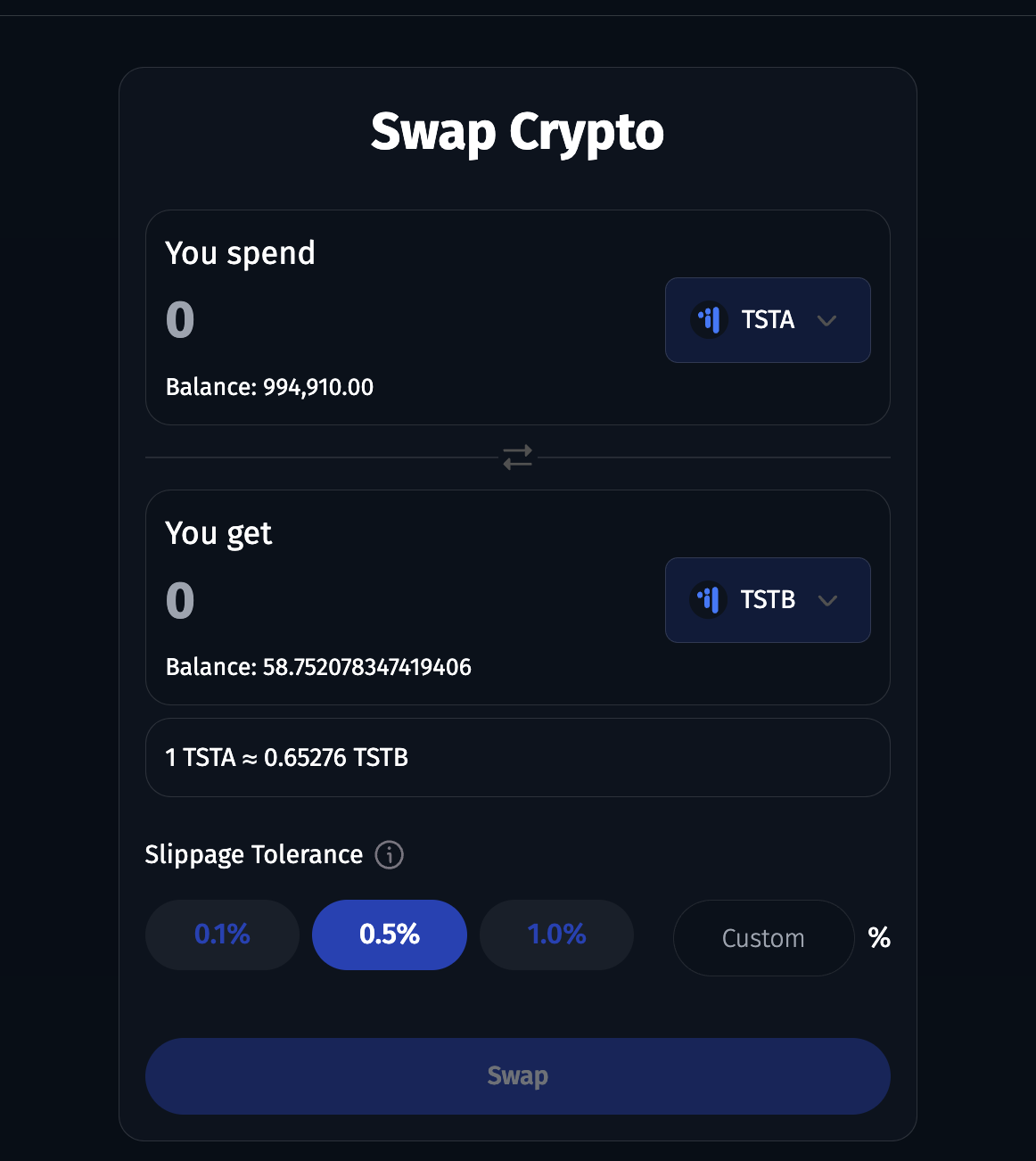
1. Once you visit the links above, you'll see a screen similar to the one below. Enter your intended amount to swap, then select a suitable slippage.

<figure><img src="https://raw.githubusercontent.com/theiceeman/asset-chain-assets/main/gitbooks/swap/1.png" alt=""><figcaption></figcaption></figure>

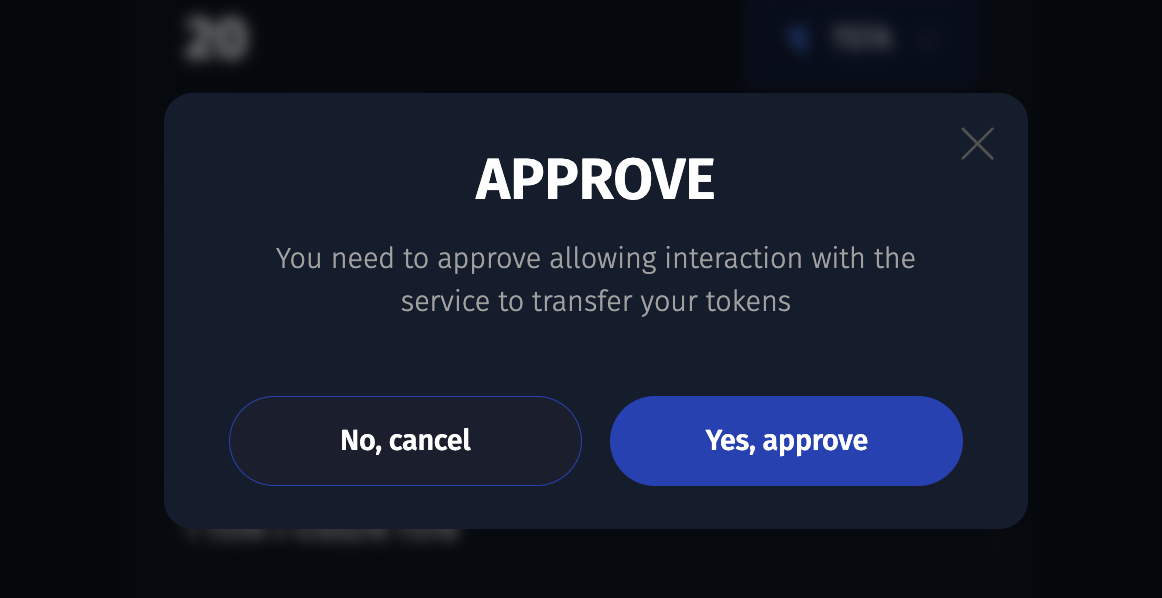
2. Click on the approve button, to approve the contract to spend your token on your behalf.

<figure><img src="https://raw.githubusercontent.com/theiceeman/asset-chain-assets/main/gitbooks/swap/2.png" alt=""><figcaption></figcaption></figure>

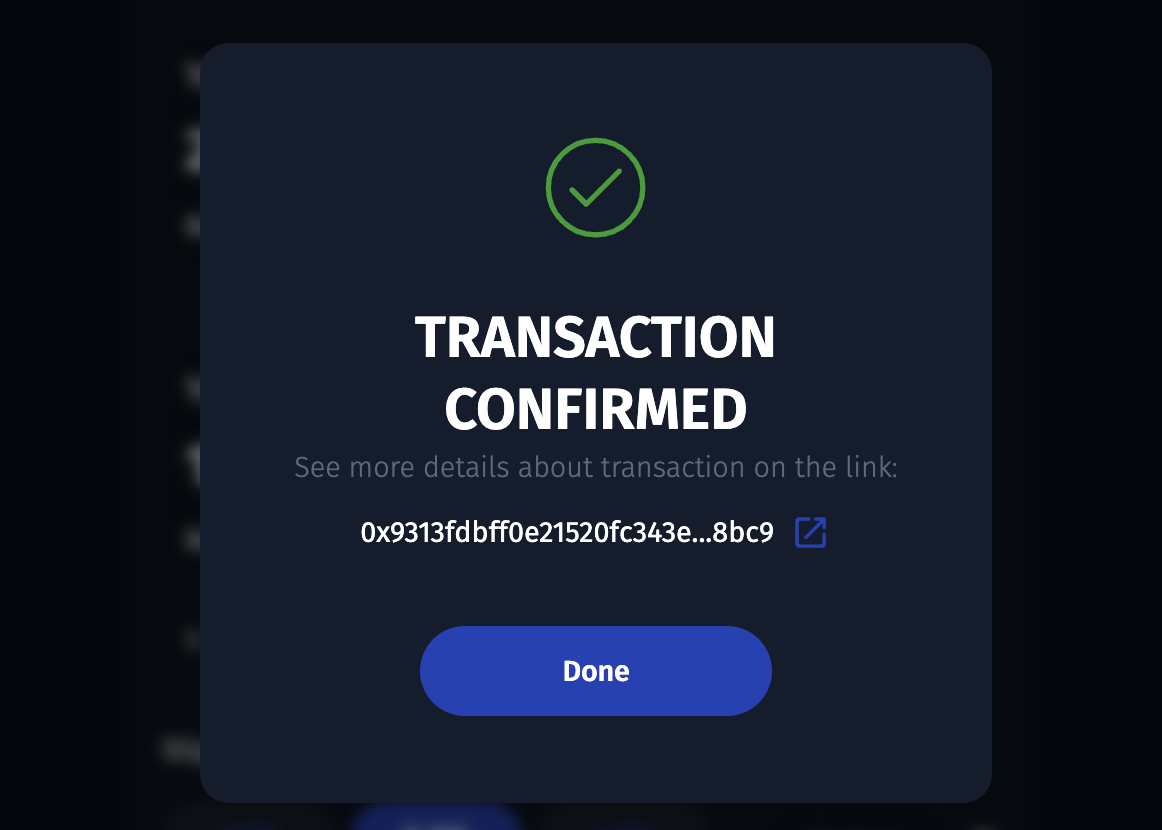
3. After confirming the transaction in your wallet, you should see a similar screen below. Approval was successfull. Next up is actual swapping.

<figure><img src="https://raw.githubusercontent.com/theiceeman/asset-chain-assets/main/gitbooks/swap/3.png" alt=""><figcaption></figcaption></figure>

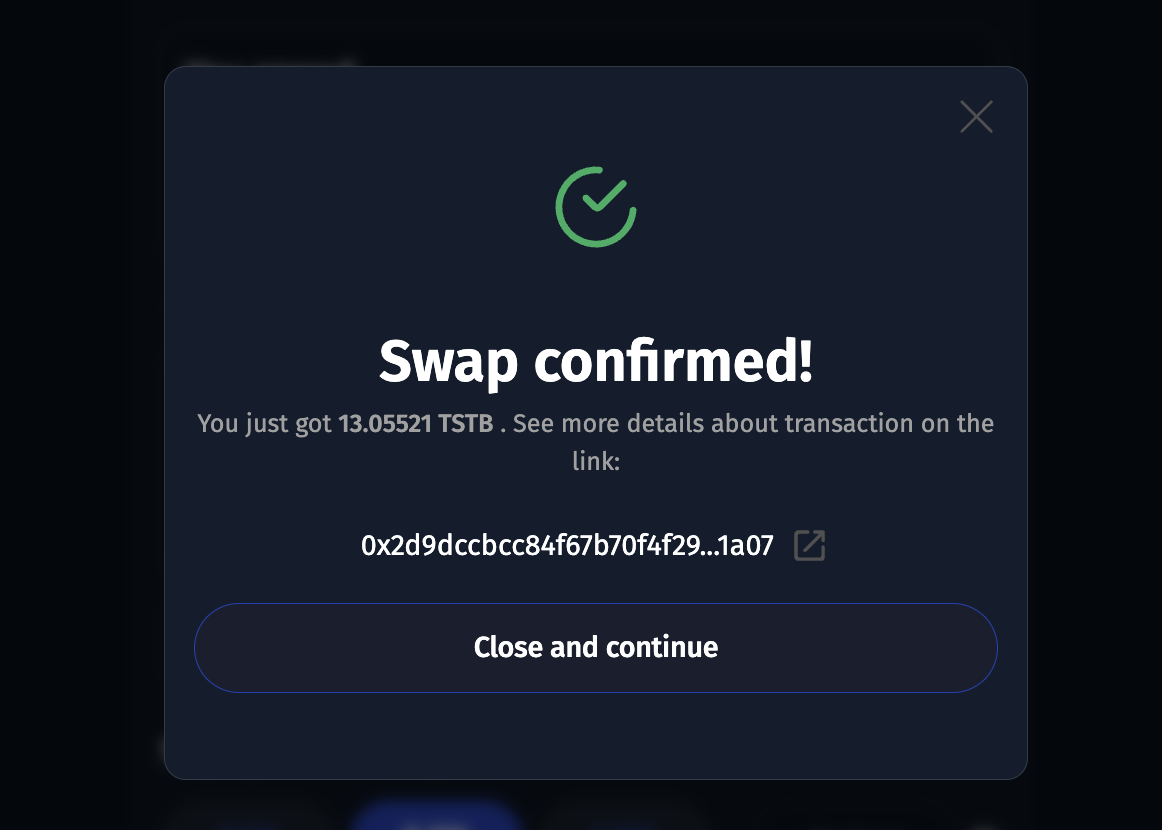
4. Click on the swap button, and sign the transaction. You should see a modal similar to the one below, if successful.

<figure><img src="https://raw.githubusercontent.com/theiceeman/asset-chain-assets/main/gitbooks/swap/4.png" alt=""><figcaption></figcaption></figure>

{% hint style="success" %}
Congratulations! You've swapped your token successfully.
{% endhint %}

## Locking Liquidity Positions

When you provide liquidity on AssetChain Swap application, you also have the option to lock that liquidity position for a period of time. In this period of time, you don't have the permission to perform any actions on your liquidity position.

The following are steps to lock liquidity position on the [AssetChain Swap application](https://swap-testnet.assetchain.org)

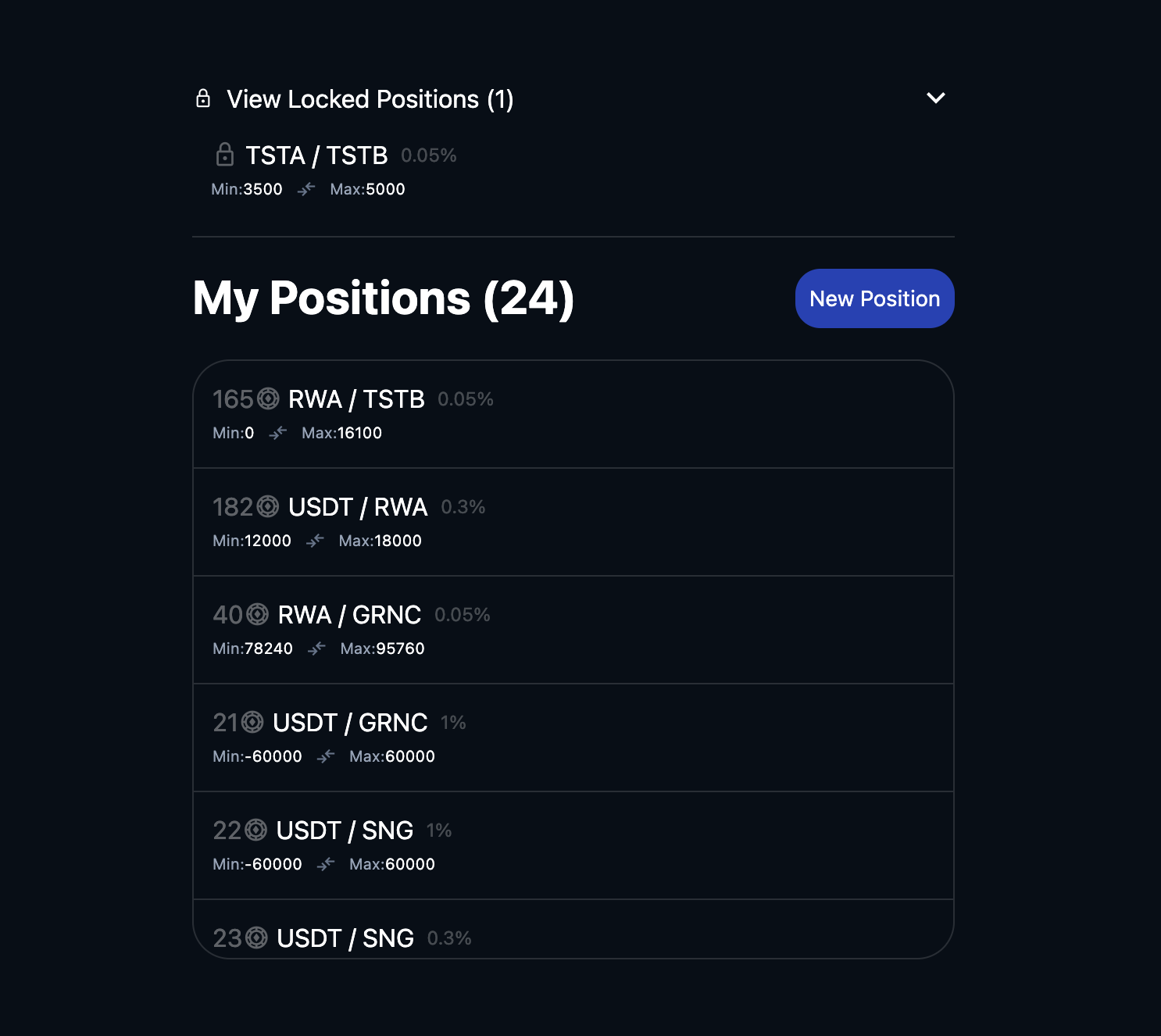
1. View Liquidity Positions

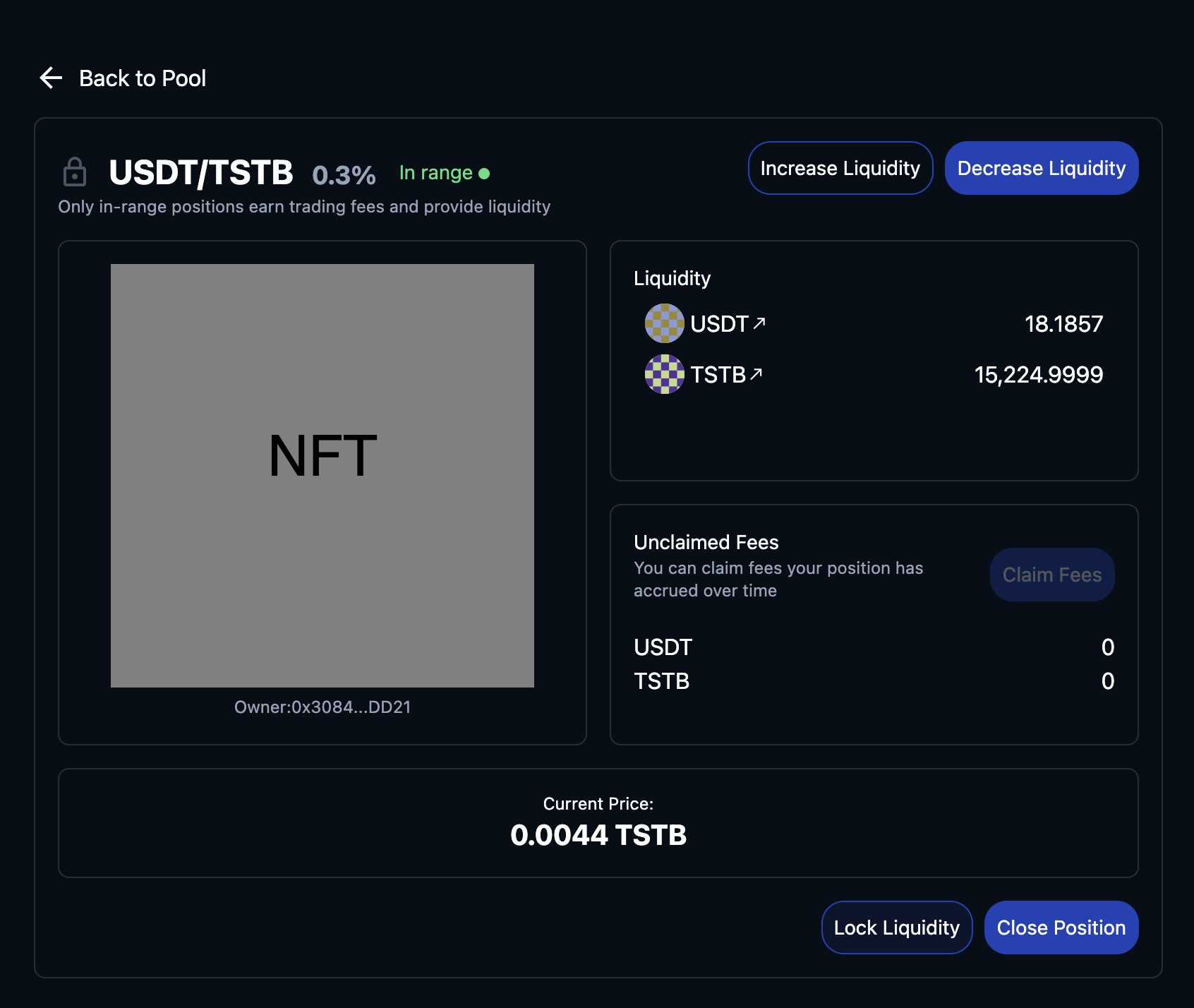
<figure><img src="https://raw.githubusercontent.com/theiceeman/asset-chain-assets/main/gitbooks/swap/1-positions-page.png" alt=""><figcaption><p>View Liquidity Positions</p></figcaption></figure>

2. Single positions. This page has the 'Lock Liquidity' button below for positions that are not locked.

<figure><img src="https://raw.githubusercontent.com/theiceeman/asset-chain-assets/main/gitbooks/swap/2-single-positions-page.png" alt=""><figcaption><p>Lock Liquidity</p></figcaption></figure>

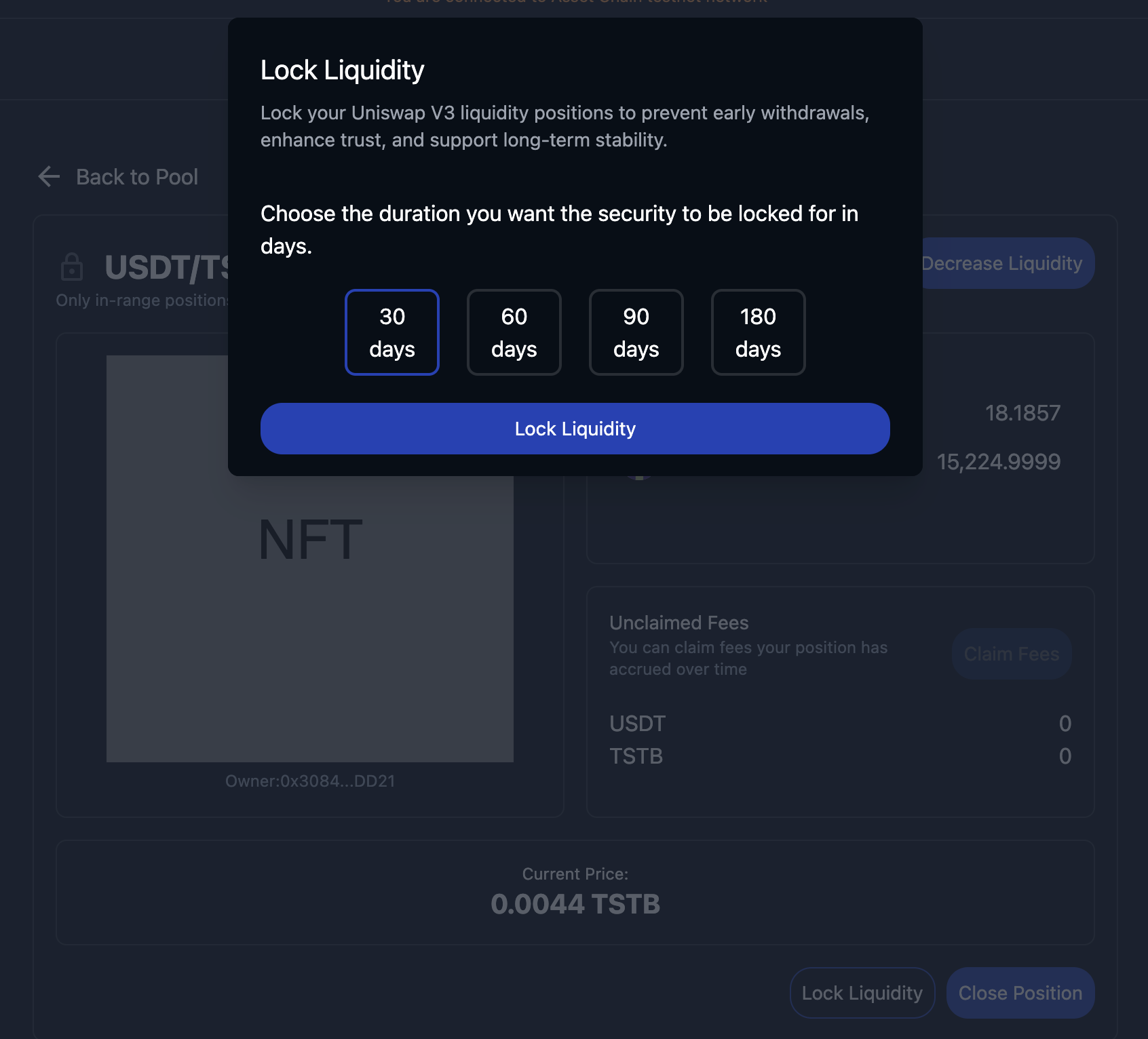
3. Choose lock period. This is the number of days in which you cannot perform any functions like closing position or decreasing liquidity in your position.

<figure><img src="https://raw.githubusercontent.com/theiceeman/asset-chain-assets/main/gitbooks/swap/3-choose-lock-period.png" alt=""><figcaption><p>Choose lock period</p></figcaption></figure>

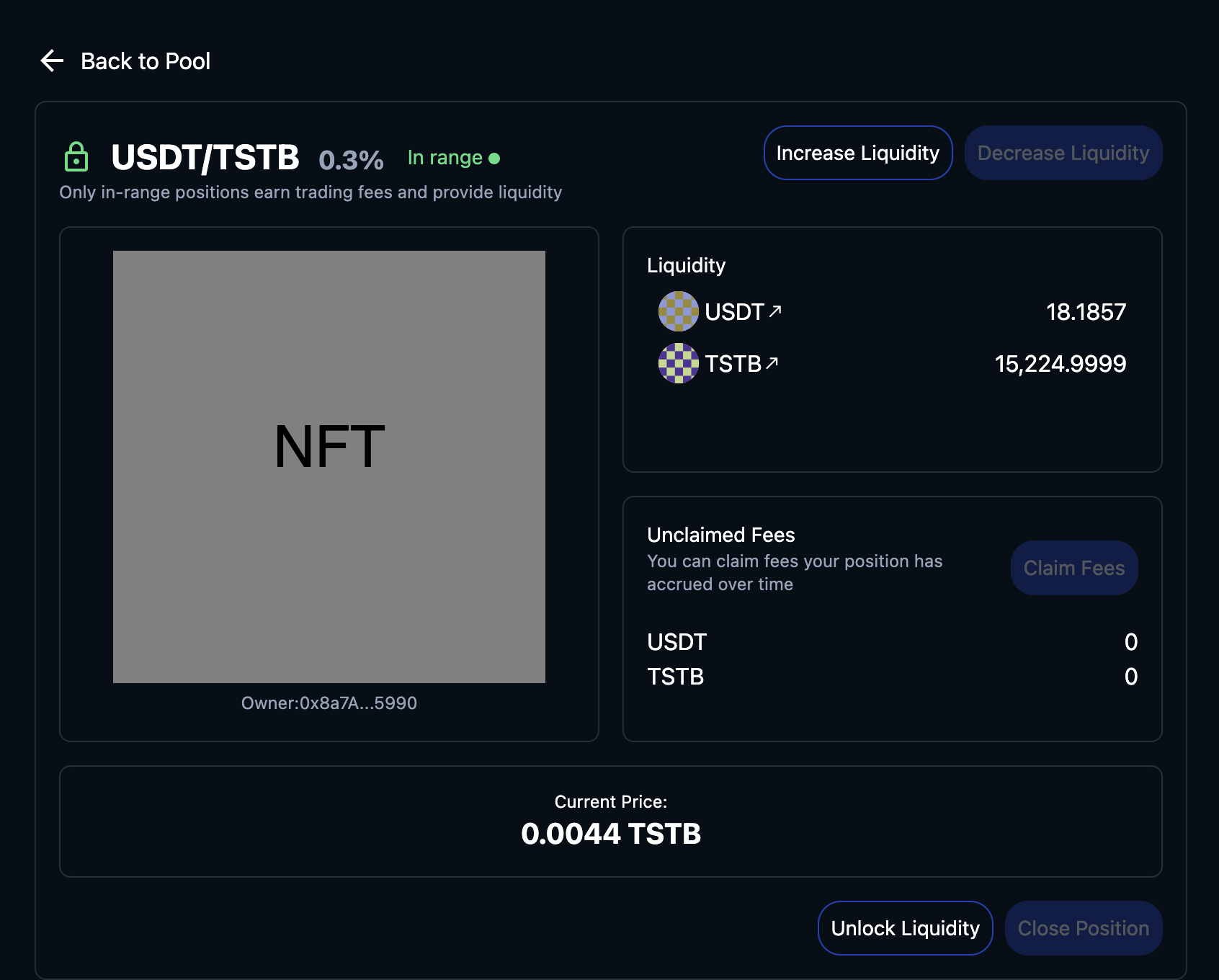
4. Locked Position.

<figure><img src="https://raw.githubusercontent.com/theiceeman/asset-chain-assets/main/gitbooks/swap/4-lock-liquidity-page.png" alt=""><figcaption><p>Locked position page</p></figcaption></figure>

{% hint style="success" %}
Congratulations! You've locked liqudity successfully.
{% endhint %}

{% hint style="info" %}
For supported Testnet tokens, just reach out to the team [here](https://t.me/AssetChainBuilders)
{% endhint %}


# Indexer

Stream blockchain data seamlessly

Indexers facilitate streamlined access to on-chain data, encompassing transaction histories, smart contract states, and event logs.

Asset Chain currently supports the project below, to enable swift and effective data access and query functionality.\\

### [Subquery](https://subquery.network/)

Subquery is a leading blockchain data indexer that provides developers with fast, flexible, universal, open source and decentralised APIs for web3 projects.

Subquery supports many ecosystems including Asset Chain, Ethereum, Cosmos, Near, Polygon, Polkadot, Algorand, and more.

{% embed url="<https://academy.assetchain.org/module-4-intermediate-tutorials/setting-up-an-indexer>" %}


# Wallets

Like all evm chains and L2's we support all evm wallets. We highly recommend these tho:

### Metamask

MetaMask is a self-custodial wallet. A safe and simple way to access blockchain applications and web3.

{% embed url="<https://metamask.io>" %}

### Coinbase Wallet

Coinbase Wallet supports hundreds of thousands of coins and a whole world of decentralized apps. Its a self-custody crypto wallet, putting you in control of your crypto, keys, and data.

{% embed url="<https://www.coinbase.com/en-ca/wallet>" %}

### TrustWallet

A self-custody multi-chain platform, Trustwallet support millions of assets across 100+ blockchains. From Bitcoin, Ethereum, and Solana, to Cosmos, Optimism, and much more.

{% embed url="<https://trustwallet.com/>" %}

### Wallet Connect

An Open protocol for connecting Wallets to Dapps, supports Asset Chain. Wallet Connect's, Wallet Kit boasts features that provide a simple, secure way for your wallet users to easily connect with thousands of apps.

{% embed url="<https://walletconnect.com/walletkit>" %}


# Faucets

Get Testnet RWA

### POW Faucet <a href="#public-rpc-archival-node" id="public-rpc-archival-node"></a>

This is an $RWA Faucet running on the Asset Chain Testnet. This faucet requires some mining work to be done in exchange for free testnet funds.

{% embed url="<https://faucet.assetchain.org/>" %}

### How To Use The Faucet

Follow the steps below on how to claim test RWA from the faucet:

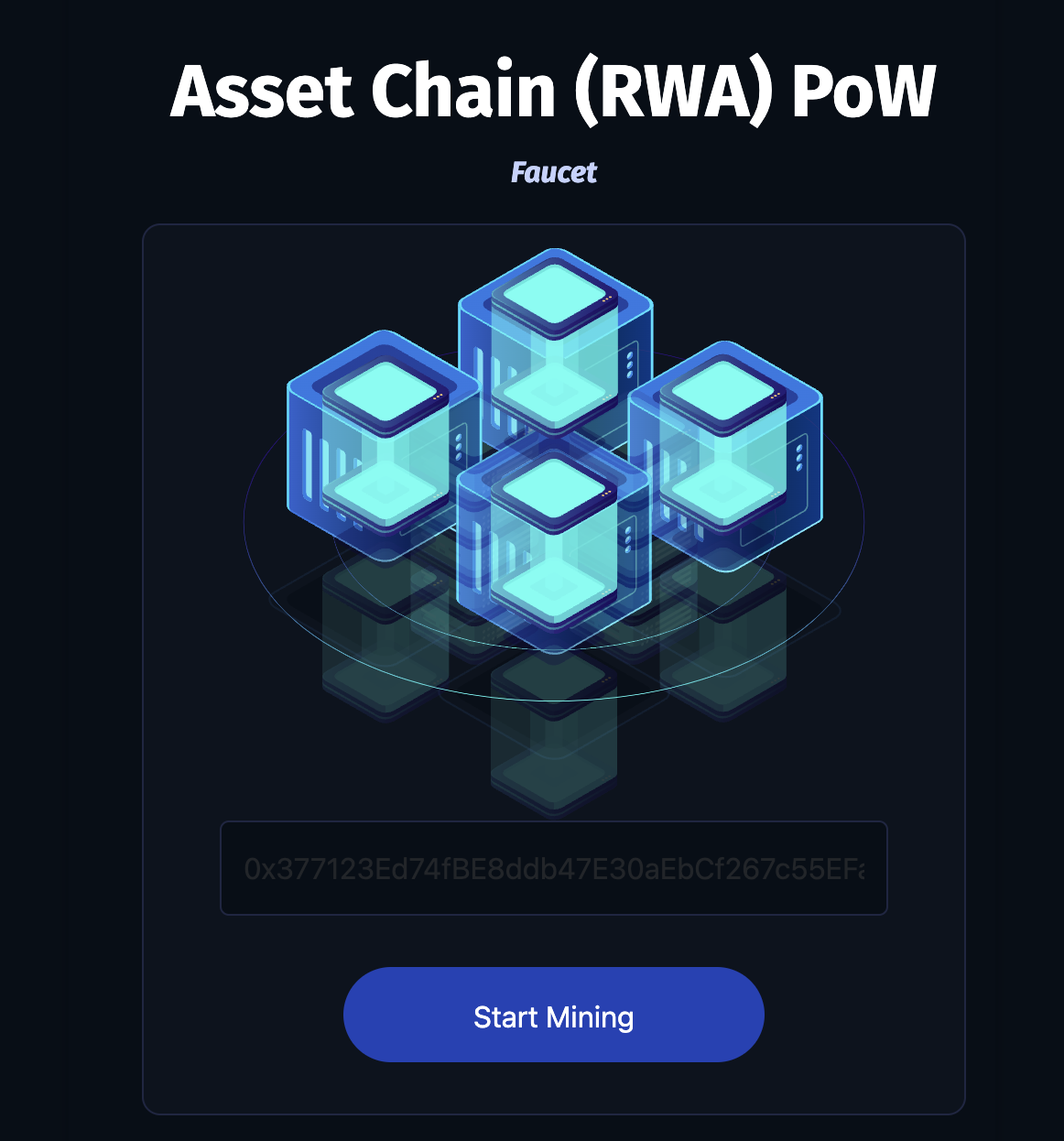
1. Visit the link above, paste your wallet address into the input. Then click on start mining.

<figure><img src="https://raw.githubusercontent.com/theiceeman/asset-chain-assets/main/gitbooks/faucet/1.png" alt="" width="563"><figcaption><p>begin mining on faucet</p></figcaption></figure>

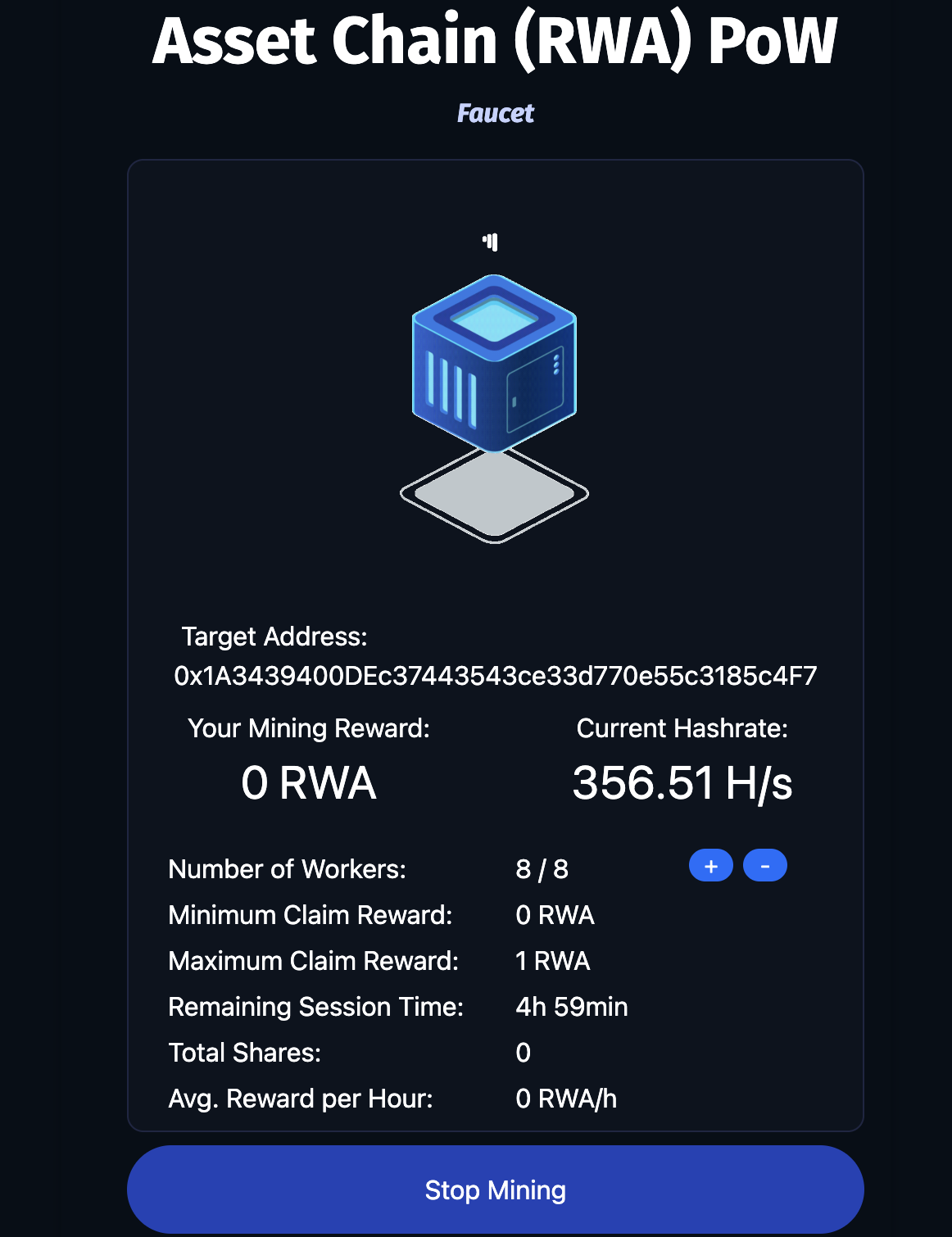
2. The faucet will begin the process of mining some test RWA tokens that will be sent to you. The longer you allow the faucet to mine, the more Test RWA you'll earn. You can click `stop mining` once you're done.

<figure><img src="https://raw.githubusercontent.com/theiceeman/asset-chain-assets/main/gitbooks/faucet/2.png" alt="" width="563"><figcaption><p>mining token</p></figcaption></figure>

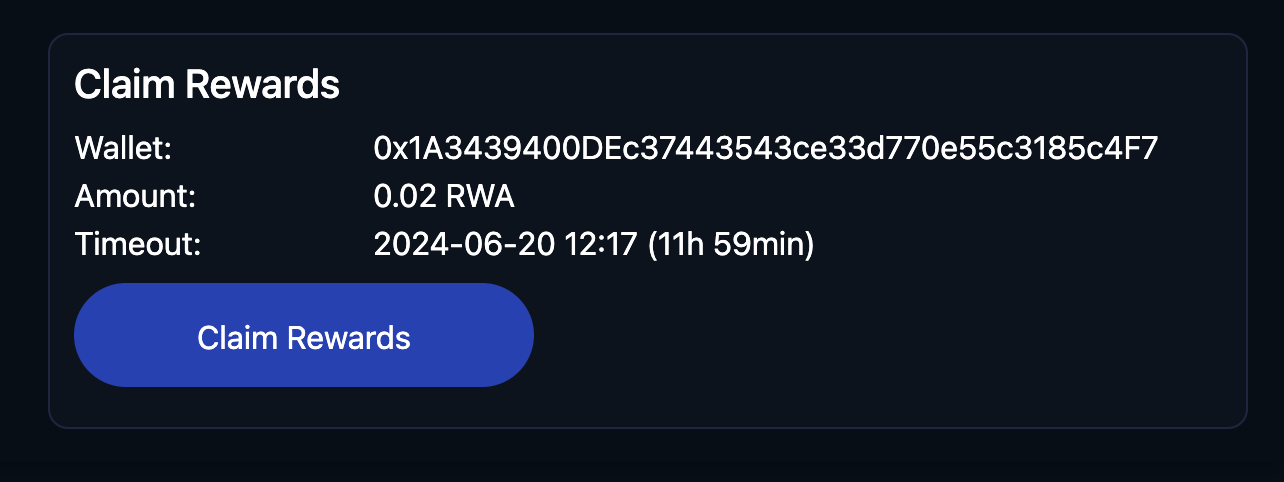
3. Once you're done mining, the faucet directs you to claim your Test RWA.

<figure><img src="https://raw.githubusercontent.com/theiceeman/asset-chain-assets/main/gitbooks/faucet/3.png" alt="" width="563"><figcaption><p>claim rewards</p></figcaption></figure>

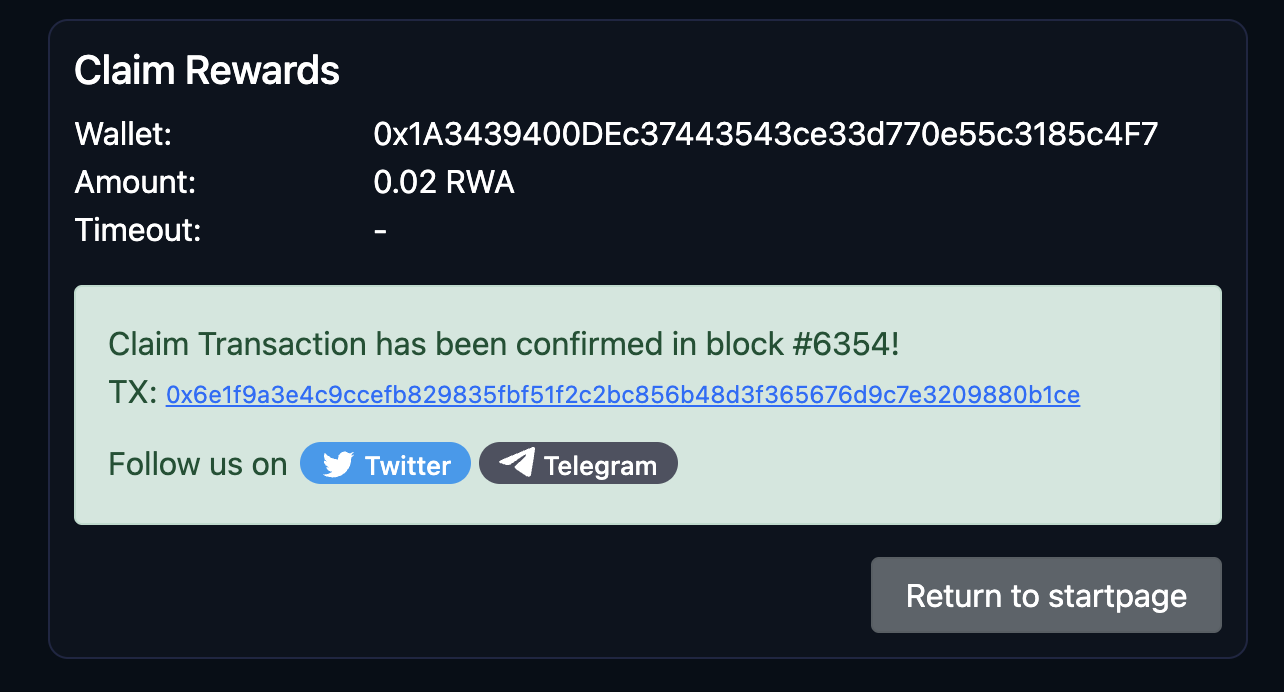
4. If your claim is successful, proceed to check the wallet address you entered previously, on the Asset Chain Testnet for deposit of your Test RWA.

<figure><img src="https://raw.githubusercontent.com/theiceeman/asset-chain-assets/main/gitbooks/faucet/4.png" alt="" width="563"><figcaption><p>claim successful</p></figcaption></figure>

{% hint style="success" %}
Congratulations on claiming your test RWA!\
Proceed to explore the blockchain, built for Real World Assets.
{% endhint %}

{% hint style="info" %}
For supported Testnet tokens, used to bridge & swap; just reach out to the team [here](https://t.me/XendFinanceDevs)
{% endhint %}


# Block Explorers

A list of block explorers

### Asset Chain Advanced Explorer <a href="#blockscout" id="blockscout"></a>

This explorer built by Blockscout is an open-source tool for inspecting and analyzing EVM based blockchains.

With features like; smart contract verification, APIs, deep search, contract interactions, which all makes it suitable for in-depth exploration of transactions on Asset Chain .

**Mainnet explorer:** [https://scan.assetchain.org](https://scan.assetchain.org/)

**Testnet explorer:** [https://scan-testnet.assetchain.org](https://scan-testnet.assetchain.org/)


# Liquidity Mining

The **Asset Chain Liquidity Mining Program** is a strategic initiative aimed at deepening on-chain liquidity and rewarding participants for their engagement. Users earn points for performing various tasks within the Asset Chain ecosystem. These points will be redeemable at the end of the program for exclusive rewards.

This program incentivizes participation across decentralized finance (DeFi) activities, referral growth, and social engagement, all while contributing to the success of Asset Chain.

{% hint style="info" %}
The Asset Chain team reserves the right to modify point formulas, reward structures, and program rules at any time. Participation does not guarantee rewards and is subject to change without notice.
{% endhint %}

***

## 🚀 Gas Station

The **Asset Chain Gasoline Station** ensures users have enough gas fees (in **RWA tokens**) to perform basic on-chain operations.

> You can claim free gas to interact with dApps such as swapping, bridging, and liquidity provision on the Asset Chain Network.

***

## 🎯 What You Can Do

Participants can earn points by completing a variety of tasks:

### ✅ Blockchain Tasks

* Swap (trade) tokens on Asset Chain DEXs
* Bridge tokens from other chains
* Provide and lock liquidity

### ✅ Social Tasks

* Connect your X and Telegram accounts
* Complete verified social campaigns

### ✅ Referral Program

* Share your referral code to invite new users and earn bonuses

Points are awarded when task criteria are met and can be multiplied based on activity and community status.

***

## 🌉 Bridging

**Bridging** means transferring tokens from another blockchain to Asset Chain.

* Use the official bridge: <https://bridge.assetchain.org>
* Or any supported ecosystem bridge

### 🧮 Bridging Points Formula

```
Points = base × √(amount in USD)
```

* `base` is a predefined point multiplier
* `amount` is the USD value of the bridged token

> **Note:** Bridging points are initially marked as **locked**. They are **unlocked** only after:
>
> * The bridged token is used to **create a liquidity position**,
> * The position becomes **locked**
> * Once you lock your position, it takes 24 hours max for your locked points to become unlocked.
> * There is a maximum of 100 points for every bridge points you get i.e. if after your calculation of points and you have more than 100, only 100 points will be given.

***

## 🔄 Swapping (Trading)

**Swapping** refers to trading one token for another within Asset Chain. Supported platforms include:

* Official DEX: <https://swap.assetchain.org>
* Other decentralized exchanges on Asset Chain

### 🧮 Swapping Points Formula

```
Points = base × √(amount in USD)
```

Higher-value trades result in more points. Your trades only get points if the value of your trade is 10 USD or more.

***

> **Note:** :
>
> * Your trades only gets points when you trade 10 USD worth of tokens or more in recognized pools here,
> * There is a maximum of 100 points for every swap points you get i.e. if after your calculation of points and you have more than 100, only 100 points will be given.

## 🔒 Locking Liquidity Positions

Providing liquidity means depositing token pairs into liquidity pools. Locking that liquidity increases point rewards.

### 🧮 Locked Liquidity Points Formula

```
Points = (base + √(amount locked in USD)) × lock duration multiplier
```

* You only get points if your locked position has a value greater than 500 USD.
* For lock duration multiplier: 30 to 90 days have a 1.2x multiplier, 90 to 180 days have a 1.5x multiplier, and more than 180 days have 2x multiplier.
* Your locked points from bridging also gets unlocked only when you get points from your locked position.
* Locked positions help stabilize the protocol and benefit the entire ecosystem

***

## 🧑‍🤝‍🧑 Referral Program

Invite others to Asset Chain and earn additional rewards!

### Referral Structure

| Tier   | Description                    | Trading Fee Commission | Points Bonus |
| ------ | ------------------------------ | ---------------------- | ------------ |
| Tier 1 | Your direct referrals          | 5%                     | 20%          |
| Tier 2 | Referrals of your Tier 1 users | 2%                     | —            |

* Generate your referral code from the dashboard
* Share it with others to earn passive rewards from their activity

```
Participant
├── Tier 1 Referral
│   ├── Tier 2 Referral
│   └── Tier 2 Referral
├── Tier 1 Referral
│   ├── Tier 2 Referral
│   └── Tier 2 Referral
└── Tier 1 Referral
    └── Tier 2 Referral
```

***

### 🤓 Point Distribution Table

### For Bridge

| TOKEN          | Asset Chain Address                                                                                                       |
| -------------- | ------------------------------------------------------------------------------------------------------------------------- |
| xRWA (Bridged) | [0x02afe9989D86a0357fbb238579FE035dc17BcAB0](http://scan.assetchain.org/token/0x02afe9989D86a0357fbb238579FE035dc17BcAB0) |
| USDC (Bridged) | [0x2B7C1342Cc64add10B2a79C8f9767d2667DE64B2](http://scan.assetchain.org/token/0x2B7C1342Cc64add10B2a79C8f9767d2667DE64B2) |
| WNT (Bridged)  | [0xEc6943BB984AED25eC96986898721a7f8aB6212E](http://scan.assetchain.org/token/0xEc6943BB984AED25eC96986898721a7f8aB6212E) |
| USDT (Bridged) | [0x26E490d30e73c36800788DC6d6315946C4BbEa24](http://scan.assetchain.org/token/0x26E490d30e73c36800788DC6d6315946C4BbEa24) |

### For Swap

| ASSET       | FEE TIER | LINK                                                    |
| ----------- | -------- | ------------------------------------------------------- |
| USDT/WNT    | 1%       | [Link](https://swap.assetchain.org/statistics/pools/17) |
| USDT/cNGN   | 0.3%     | [Link](https://swap.assetchain.org/statistics/pools/19) |
| xRWA/WETH   | 0.3%     | [Link](https://swap.assetchain.org/statistics/pools/27) |
| xRWA/USDT   | 0.3%     | [Link](https://swap.assetchain.org/statistics/pools/24) |
| xRWA/USDT   | 1%       | [Link](https://swap.assetchain.org/statistics/pools/32) |
| xRWA/SHALOM | 1%       | [Link](https://swap.assetchain.org/statistics/pools/44) |

## 🌐 Communities

Participants who are members of recognized **Asset Chain communities** are eligible for **point multipliers** when they complete tasks.

> Being part of a community helps boost your score and encourages teamwork toward shared goals.

***

## 🏆 Leaderboard

Track your progress and see how you rank against other participants.

* The **leaderboard updates every 24 hours at 9:00PM WAT** after daily point distribution
* Top-ranking users may qualify for exclusive bonuses and recognition

***

## 📣 Social Tasks

Earn extra points by completing tasks on social platforms:

### Supported Actions

* Follow Asset Chain on **X (Twitter)**
* Join the **Telegram** group
* Retweet or share official campaign posts

### How to Participate

1. Connect your **X** and **Telegram** accounts via the dashboard
2. Complete social tasks and verify them to receive points

***

***

## Reputation Leaderboard Guide

The reputation leaderboard refreshes **every day at 8:00 PM** to keep everything up to date.

### What Gets Tracked

* **Mentions** → For each task, the system fetches **20 mention activities**.
* **Repost** → For each task, the system fetches **20 repost activities**.
* **Followers** → For each task, the system fetches **200 follower activities**.

👉 If there’s a high demand, admins can **manually speed things up** so tracking happens faster.

### Special Case: Telegram Join Tasks

For tasks that require you to **join a community, group, or channel on Telegram**:

* The system checks your join **once only**.
* There’s **no waiting time** — it’s verified immediately.

***

***

## 📈 Liquidity Pool APR

Annual Percentage Return (APR) is the estimated annual yield for a specific pool. For example, the USDT/cNGN 0.3% fee tier pool generates returns based on trading volume and the total value locked (TVL) in that pool. Higher trading activity and lower TVL typically result in higher APR for liquidity providers.

***

## 🚫 Rules & Disqualification

To ensure fairness, participants must only use one account and avoid any form of manipulation, including wash trading, Sybil attacks, or exploiting smart contracts or reward systems. Any attempt to game the system may result in point removal, leaderboard reset, or permanent disqualification.

The Asset Chain team reserves the right to disqualify users at its discretion for suspicious behavior, abuse of referral systems, or failure to comply with program rules. All decisions are final, and disqualified users forfeit any unclaimed rewards.

## 🎁 Conclusion

The **Asset Chain Liquidity Mining Program** empowers you to earn rewards while supporting the growth of the ecosystem.

Take advantage of every opportunity:

* Bridge tokens
* Provide and lock liquidity
* Trade actively
* Grow the community through referrals and social engagement

Start participating today and rise to the top of the leaderboard!

***

*Stay updated on announcements and opportunities through our official channels.*


# Asset Chain Academy

This is a free online school dedicated to onboarding developers into the world of building Decentralized Applications for the future of the Web.

{% embed url="<https://academy.assetchain.org/>" %}


# Branding Guideline

Brand Kit for Asset Chain

<https://mega.nz/folder/YfQRjTxA#cVMGOLORcxCe-InxTE2EaA>


# Official Links

### Products

* **Asset Chain Swap:** [https://swap.assetchain.org](https://swap.assetchain.org/)
* **Native Bridge:** [https://bridge.assetchain.org](https://bridge.assetchain.org/)
* **Basic Explorer:** [https://explorer.assetchain.org](https://explorer.assetchain.org/)
* **Advanced Explorer:** [https://scan.assetchain.org](https://scan.assetchain.org/)

### Community

* **Asset Chain Twitter / X:** [https://x.com/rwaassetchain<br>](https://x.com/rwaassetchain)
* **Asset Chain Discord:** [https://discord.assetchain.org](https://discord.assetchain.org/)
* **Telegram:** <https://t.me/AssetChainBuilders>
* **Youtube:** [https://www.youtube.com/@AssetChain<br>](https://www.youtube.com/@AssetChain)
* **LinkedIn:** <https://www.linkedin.com/company/theassetchain>
* **Community Blog:** <https://medium.com/asset-chain>
* **GitHub:** <https://github.com/xendfinance>


# Audits

We are audited by leading blockchain security teams.

### **Vidma**

Vidma is a professional team of smart contract *auditors*, penetration testers, and blockchain security experts who prevent hacks and exploits of your codebase.

<table><thead><tr><th width="285">Project</th><th>Audit</th><th data-hidden></th></tr></thead><tbody><tr><td>Native Staking Contract</td><td><a href="https://drive.google.com/file/d/1Hg8-BIPcVkdS_HNA4j55BYwogAkGKKs8/view">https://drive.google.com/file/d/1Hg8-BIPcVkdS_HNA4j55BYwogAkGKKs8/view</a></td><td></td></tr><tr><td>Bridge Contract</td><td><a href="https://drive.google.com/file/d/1_cfCQNldq8xzmlsVJV26rP_0DDEpRcpk/view?usp=share_link">https://drive.google.com/file/d/1_cfCQNldq8xzmlsVJV26rP_0DDEpRcpk/view?</a></td><td></td></tr><tr><td>UniswapV3 Contract</td><td><a href="https://github.com/Uniswap/v3-core/tree/main/audits">https://github.com/Uniswap/v3-core/tree/main/audits</a></td><td></td></tr><tr><td>Multisig Contract</td><td><a href="https://drive.google.com/file/d/1cAek1YU0RF7q19EvpHEge1x3fB7jwMUj/view">https://drive.google.com/file/d/1cAek1YU0RF7q19EvpHEge1x3fB7jwMUj/view</a></td><td></td></tr></tbody></table>